
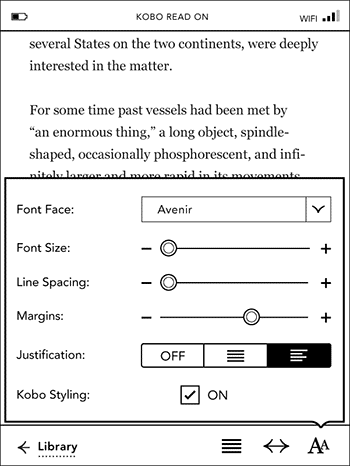
Earlier this week Kobo issued an over-the-air software update for the Kobo Touch that added a smorgasbord of new font features in addition to various performance enhancements.
There are now options to adjust line spacing, margins, and justification. Kobo also added five additional font types to choose from: Amasis, Delima, Felbridge, Gill Sans, and Rockwell. And of course you can still add other fonts of your choice to a font folder.
What’s even better is that these features work on both Kobo and non-Kobo ebooks, although sometimes margins don’t seem to adjust on certain ebooks that have had their CSS modified with Calibre.
At launch the Kobo Touch didn’t have any layout settings, and just two font types, Georgia and Avenir. The lack of options was the main negative holding it back, especially in direct comparison with the very similar Nook Touch. But now the Kobo Touch has more layout settings than the Nook, with six margin settings, nine line spacing settings, and a lot more font choices and sizes.
Kobo just closed the gap considerably with this update. Now they just need to add notes and bookmarks, along with dictionary support and annotations for non-Kobo ebooks, and the Kobo Touch will be one mighty contender.