
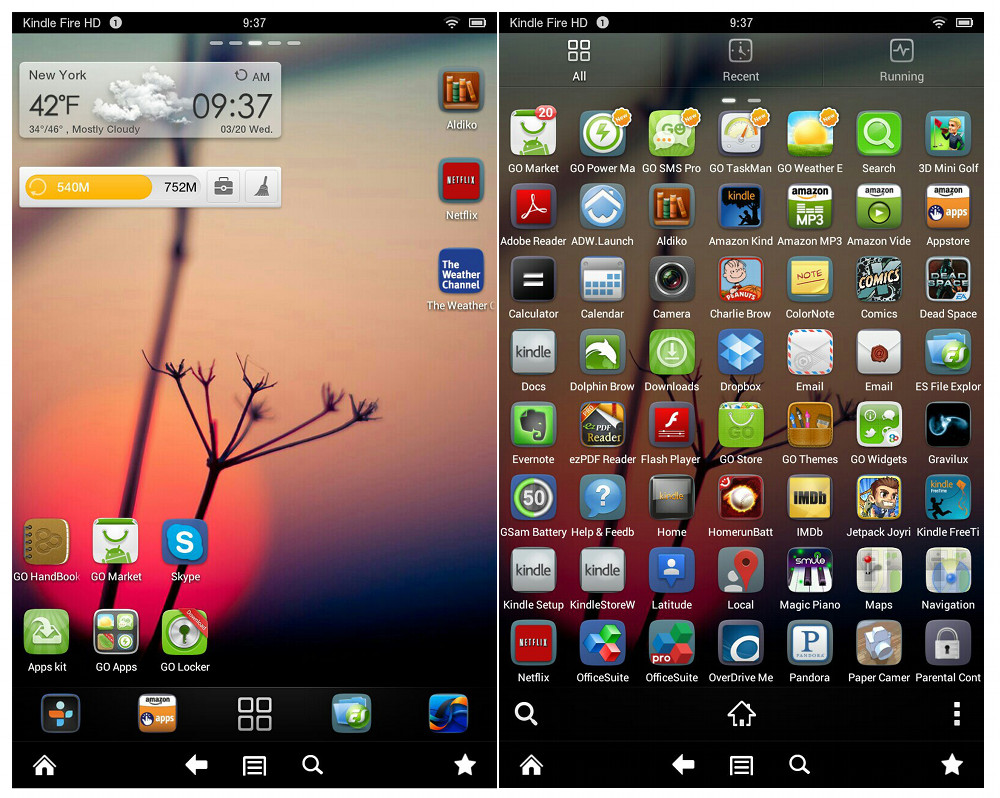
Thanks to a tip, I can confirm that there is indeed a workaround to get Go Launcher Ex to work on the Kindle Fire HD tablets, and it doesn’t require rooting, hacking, or anything complicated like that.
Basically all that is required to use Go Launcher is one extra tap on the screen after installing a secondary app. It’s not exactly convenient, but it works. And it provides another alternative to Amazon’s limited carousel homescreen that always seems to display whatever icons it wants.
Like with other homescreen alternatives for the Kindle Fire (ADW Launcher for example), not all features work because of conflicts with Amazon’s custom UI, but Go Launcher is free so all it costs is some time to initially setup and explore.
I tried using it a little today and I was able to get some of the Go widgets to work, such as the weather widget and quick controls widget. But I couldn’t figure out how to install a different wallpaper or any of the themes. All the “Go” links want to direct to the Google Play store, which doesn’t work on the Kindle Fire HD unless you root it.
Here’s how to install Go Launcher on the Kindle Fire HD:
1. First, make sure your Kindle has “allow installation of applications from unknown sources” turned on in settings under device.
2. Download and install Go Launcher from 1Mobile or some other alternative appstore. You can install the 1Mobile app if you want but I never cared for it so I just used the Kindle’s web browser to download from the link above. To do that make sure you choose “install to PC” from the drop down list to get the apk file.
3. After installing Go Launcher, download and install Go TouchHelper. You can then use Go TouchHelper to get to Go Launcher. Just pin it to your favorites menu to get to it quickly.
Tip: The first time I opened Go TouchHelper it was using some confusing WP theme. To change it hit the settings wheel icon and then choose the default theme from the settings menu. From there you just have to hit the purple home icon to get to the Go Launcher homescreen.
(Thanks for the tip, Jacob)
Done. Interesting. Hmmm.
Thank you it works! I just wish the Kindle Fire would open automatically to go launcher. I did get a theme to work I got the theme in 1mobile market. Love the way it looks.
now how do i change it back??????
One way is to go into app settings and uninstall it.
1. I can get to the Go launcher home screen by going the long way. How do I pin it to the favorites menu (which favorites)? Thank you.
You have to pin the TouchHelper app to the favorites by long-pressing the icon from the carousel homescreen.
It was so simple that’s why I did not think to to it. Thank you, may all yor babies be born naked.
I USE an app called My Kindle Wallpaper to set so in both launchers Adw and Go.
Go toughened will not open
Go touchhelper
Maybe a restart will help or try uninstalling it and reinstalling it again.
It won’t work
can’t open file after downloading 🙁
After download it won’t open – how can I do pls??
Hello,
I have the same problem, I suspect if your kindle now has version 7.4.1 the launcher will not work, Also I had been using ADWex with no problem until today because of this update. ADWex still works except now wallpaper can be set at all now.
Can anyone confirm this??
I got Go Luancher EX installed and it runs but I can’t set any wallpaper and I can’t download anything from the Google Play store/market from my Kindle Fire HD 7. Is there a way to use Google Play from the KFHD 7? I was able to download some backgrounds/wallpapers from Mobile 1 I think it is but they don’t seem to work either. Also can the KDHD 7 use live wallpaper?
The latest firmware update broke wallpapers on alternate launchers unfortunately. And Google Play won’t work unless you hack it or install an alternate operating system like CM10 for Android 4.2 .
Do you know how to change the wallpaper? Please help.
I haven’t found a way since Amazon broke it with the last update.
Works perfectly! Is there a way I can keep it as my default.
Office suite says that the file is corrupt what can I do?
You can probably download it from some alternate appstore like 1mobile. But Amazon kind of broke it awhile ago with an update that makes it so you can’t set the wallpaper on the homescreen. It remains a black background all the time now. Still works otherwise.
About my: Kindle Fire HD Hello, For fairness I disclose I’m 48 and very new to computers,the internet I just got a Facebook page a couple of months ago, constant nagging by my kids. So I’m not gadget girl. But I’m trying better late than never. Please help… I noticed a bunch of preinstalled software for my Kindle had no data it still works I noticed the location stuff wouldn’t work,nor blue tooth. I was wondering if I told you the names of the app’s, sorry for my lingo knowledge perhaps you could give me some advice on how to fix this. It probably happened 1# When I was pushing way too many buttons after I downloaded one of or a mixture of either file explorer 3 or one of those cleaning apps or Kings office..something or well I’m pretty sure you get the idea. I was on my own and kept being told the only way you learn is to mess with it and you’ll figure it out. The only big thing I’ve learned is I was asking the wrong person for help. Again better late than never oops a little bit to late though this time. One of the pre-installed apps is Talk Back, Please help me and in advance Thanks for reading or listening or how ever I should say it. Thank you very much, Carrie