The eBook Reader Blog

 Subscribe in a reader

Welcome to the eBook Reader Blog, where you can keep updated on the latest ebook reader news, free ebooks, ereader sales and discounts, and get hands-on, expert reviews of the latest new devices.

Please note that tags and categories only pertain to this blog, not the entire website.

Make sure to use the navigation to the left and the search box below to find more reviews and detailed articles about ebook readers and ebooks here on The-eBook-Reader.com.

Custom Search

Pandigital Novel Personal eReader First Impressions, Availability Updates
Pandigital Novel Personal eReader

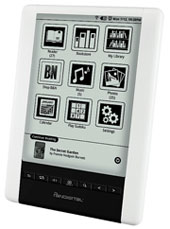
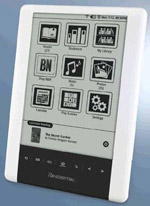
There’s a new epaper ebook reader from Pandigital called the Pandigital Novel Personal eReader that is now available from Kohls and eBay.

Kohls does not have it listed online yet, but it is listed in their weekly advertisement for $149 and is available in stores. I was able to sign up for a Kohls account to take an additional 20% off that price, so after taxes I paid less than $130 with the $15 mail in rebate—not too bad for a WiFi-equipped 6-inch touchscreen ereader.

Read More

The New Pandigital Novel Personal eReader
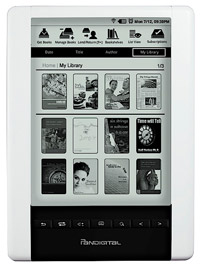
Pandigital eReader

Pandigital has just announced a new ebook reader that will go on sale later this month, the Pandigital Novel Personal eReader (as opposed to all the non-personal ones).

Unlike Pandigital’s two other ereaders that have color LCD displays, this new one has a monochrome epaper screen like the Kindle and Sony. The difference, however, is that the Pandigital Novel Personal eReader uses a different screen from a company called SiPix.

SiPix screens are popular in Asia, but haven’t reached the US yet. The Cybook Orizon is another new ereader getting set to release that is using these new types of displays.

As far as features go, the new Pandigital eReader looks pretty promising. First off, the hardware appears to be a BenQ variant, and the SiPix touchscreen indicates that as well. Like the color Pandigital Novel, it has Wi-Fi and ties in with Barnes and Noble’s ebook store for downloading ebooks. Other goodies include a web browser, integrated email application, 2GB of memory with a microSD card slot, G-sensor automatically rotates screen, built-in speaker, Adobe DRM support—all for a price tag of $199.

Here’s the important info from the press release:

Read More

Black Pandigital Novel

Pandigital Novel Black

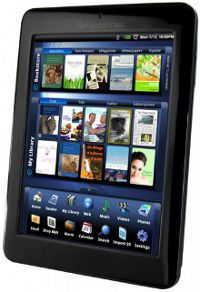
Pandigital officially announced today a new black Pandigital Novel that has some upgrades in features over the white model that I reviewed a couple of months ago.

The new Pandigital Novel is expected to hit stores next month for the suggested retail price of $199.

Like the white version, this one ties in with Barnes and Noble’s ebook store, has a 7-inch LCD touchscreen, with a matte finish instead of glossy like the white Novel, and is really more of a multimedia/internet browsing device than an ereader.

It can play videos, music, display photos and sideshows, and most importantly it has a Google Android operating system, although apps currently cannot be accessed.

The main difference between the white Novel and the black Novel is that the black is slimmer, has an extra 1GB of memory, comes with a stylus, and has a matte screen instead of glossy. The black Novel also has some different hardware and button and port configurations.

Check back soon for more updates.

Pandigital Novel Update

pandigital novel

The Pandigital Novel finally got another firmware update on July 4th of all days (at least that’s the date on the zip file).

The update can be found on Pandigital’s download page, and requires the use of an SD memory card.

Working on the review for the new Kindle DX, I haven’t had much time to test the new firmware, but I will update the Pandigital Novel review shortly to include all the details about how the new firmware affects overall use and performance.

So far, it looks like the new firmware addresses a lot of the issues that kept the Novel from being mass-released a few weeks ago. The screen orientation sensor now works; you can flip the Novel and the screen flips with it. Wi-Fi seems to be staying connected better. The touchscreen responsiveness has been improved, especially with the web browser; it isn’t as jumpy anymore.

They also added the ability to read Adobe DRM ebooks, instead of just B&N’s. A huge plus.

The speed still isn’t that great. Turning pages and loading ebooks and web pages is slower than it should be, given the fact the Novel can play video. It’s not that big of a deal, but needs to be improved.

Pandigital Novel Updates: Review and Sale

I decided to go ahead and post my Pandigital Novel Review now, since I found out that the touchscreen works well using a stylus, and then I’ll update the review as Pandigital releases more firmware updates. The hands-on video review will be posted on Monday afternoon.

The Novel is getting a lot of bad press on the web. While its firmware is definitely a work in progress, the device has some upside too, especially at just $159.

In this weeks advertisements, Kohl’s is running a sale on the Novel for $174.99 with a $15 mail-in rebate. The sale is in-store only. It’s worth a look if the Novel is something you are interested in, and Kohl’s has a very customer-friendly return policy.

But first, check out the review.

Pandigital Novel Review: First Impressions

(Update: Here’s the full, updated Pandigital Novel Review.)

pandigital novel

So the Pandigital Novel that I ordered from Kohl’s arrived earlier today and I’ve been testing it out all afternoon. The first thing I did was install the latest firmware from Pandigital’s website because they are still in the process of refining it.

The Pandigital Novel reminds me a lot of the Barnes and Noble Nook. When the Nook was first released there was a big uproar about how slow and laggy it was, how the touchscreen didn’t work properly, how there was so many bugs they were crawling out of the casing, how it was a complete disaster, in short.

But after B&N started releasing firmware updates to address the issues, things began to improve quite a lot. In fact, I recently noticed that the Nook has a rating of 4.5 stars over 60 reviews on Best Buy.com—higher than I would expect, but then again the Nook didn’t come to Best Buy until after the updates improved the Nook’s functionality.

So where am I going with this, you ask?

Well, Pandigital is in the same boat: They released their device well before the firmware was ready for prime time. The touchscreen’s responsiveness is downright hair-pullingly frustrating, no matter how many times I calibrate the screen. I finally started to use the eraser end of a pencil for tapping to make selections and that actually worked fairly well, except it keeps getting eraser crud all over the screen. Page-turns? Nope. Sometimes they’ll work and other times not, eraser or no eraser. And page-turns take longer than E Ink, somehow.

And then, once in a while, it seems to work okay. Things are moving along smoothly, the screen is reacting to touch . . . and then you get into a menu with no way out because there is no back button or the the back button won’t work no matter how many times you jab it with an eraser or finger tip or gun barrel.

The only way to get out is to hold the power slide for 5 seconds and then re-boot it, which takes a good 60 seconds.

I honestly don’t think there was very much time put into initial testing of this product’s firmware. Patience is required.

Once Pandigital gets the firmware in check, the Novel has some potential at being a decent budget ereader or basic tablet. It’s all up to the firmware department.

Update: I’ve since graduated from the eraser and started using a hard-tipped stylus. The stylus works really well, even turning pages and scrolling (somewhat). Perhaps they should have considered including one . . .

Connectivity and Internet

To get Wi-Fi working I just had to let it scan for the router and then enter the password. Sometimes it connects fine and other times it keeps scanning and won’t connect.

The basic browser works fairly well, if somewhat slower. But scrolling is damn near impossible in its current touchscreen-impaired state, not to mention typing on the keyboard. No Flash support either, of course.

The browser works in portrait mode by default—to skinny—so I found the option in the settings menu of the browser to switch to landscape mode, which is much better.

One cool thing, I went to Project Gutenberg and tried to download an EPUB ebook. Good news was that it worked. Bad news is the only way to get out of the download page is to shut down the device and re-boot it again. Patience. When it gets back to the menu the book is in the library, ready to read.

The problem is there’s very little settings in the reader. No options for font type, no brightness setting, and the white of the screen sparkles like fresh snow on a sunny morning.

The options is does have are highlighting, adding notes, changing the font size, dictionary, night mode (white text on black background), search, bookmark, and jump to page.

B&N’s eBooks on the Novel

Okay. So get this. With the exception of a small menu at the top of the homepage, ebook browsing is done with the browser on B&N’s main site, not in a built-in store or an app. And the main site isn’t exactly optimized for a 7-inch screen.

In the device’s ebook library list there’s an icon that says “get ebooks”. Clicking on it brings up a prompt to sign in to Barnes and Noble. Once done, it brings up your list of ebooks on account at B&N. From here you can download them. I tried several. The download bar comes up but they never download. I tried downloading a sample of an ebook and that worked. Go figure.

I transferred several of my B&N ebooks onto an SD card and they show up on the Novel. When clicked they bring up a prompt to enter your name and cc number for B&N’s account. But I couldn’t get it to work. I even verified everything using my computer and it simply will not authorize on the Novel.

Review Part 2?

And that’s where this initial review ends and the updated Pandigital Novel review begins.

Pandigital Novel Available for Order

The Pandigital Novel is now up for order on the Kohl’s website of all places for $199. The “regular price” is listed at $259, contrary to what the initial press release stated at $199.

I placed an order and it says it’s expected to arrive between June 11th and June 17th. This is based off the shipping method, nothing official. Will update when the shipment is confirmed.

Update: Kohl’s has shipped the item; I’ll post first impressions when it arrives. Soon after I ordered, the price went up to $259, and now it says “We’re sorry, this item is no longer available” on the Kohl’s website. JC Penney has it up for $249, but is on backorder until June 23rd.

New Pandigital Color eReader Preview

pandigital novel

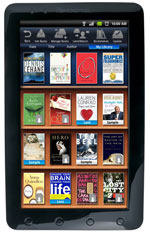
Pandigital, known for their digital photo frames and printers, announced their newest creation, the Pandigital Novel, a 7-inch multipurpose ereader with an LCD touchscreen, Wi-Fi, and an Android operating system.

The device will go on sale in June for $199 from major retailers like Sears, Staples, K-Mart, BJ’s and others.

The biggest story about the Pandigital Novel is that it is integrated with Barnes and Noble’s ebook store and will allow lending like the Nook. Another big plus is that it runs Android, so there should be plenty of cool apps.

Click here for the full page preview with photos and a video demonstration of the Pandigital eReader.

Keep Updated

Subscribe Get Email Updates

rss RSS Feed

Facebook Follow on Facebook

Twitter Follow on Twitter

YouTube YouTube Channel

Support This Site

Find this website helpful? If so, please help support this site. It's free, easy, and only takes a couple seconds. Learn how »

Latest Reviews
Latest Blog Posts