The eBook Reader Blog

 Subscribe in a reader

Welcome to the eBook Reader Blog, where you can keep updated on the latest ebook reader news, free ebooks, ereader sales and discounts, and get hands-on, expert reviews of the latest new devices.

Please note that tags and categories only pertain to this blog, not the entire website.

Make sure to use the navigation to the left and the search box below to find more reviews and detailed articles about ebook readers and ebooks here on The-eBook-Reader.com.

Custom Search

Augen eReader Review

This is just a quick note to mention that the review for the Augen eReader is now finished and can be found on the new Augen The Book Review page.

Feel free to ask any questions below.

Augen The Book e-Reader Video Review, First Impressions
Augen The Book

(Update: The full written review is now finished and is located on this new Augen The Book Review page.)

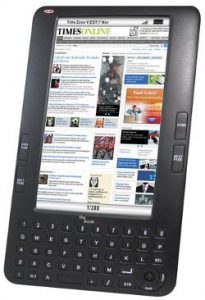
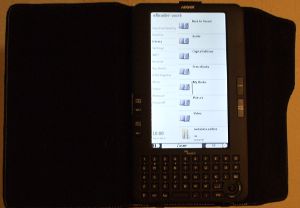
There’s a new inexpensive color ereader on the market that goes by the name of Augen “The Book” (try to work that into a grammatically correct sentence).

In addition to reading and downloading ebooks, the Augen ebook reader can display videos, images, play music, and browse the web. It has a built-in speaker, headphone jack, QWERTY keyboard, and SD card slot. Here’s a full rundown of the Augen’s specs on this earlier blog post.

While the device is still listed as pre-order on websites like JR.com for $129, I was able to find one at a local K-Mart store this morning for $89 (thanks for the tip, Grace).

Here are my first impressions of the Augen ebook reader:

The TFT LCD Display

While it has a 7-inch screen like the Pandigital Novel, the Augen ebook has a much narrower screen because it is has a resolution of 800 x 480 instead of 800 x 600 like the Novel. The actual screen size is about 6″ x 3.4″. And in case it isn’t obvious, the Augen does not have a touchscreen.

The color and quality of images and videos are both fairly decent given the price of the device, and the screen isn’t nearly as reflective as most LCD displays. The font for menus and DRM-free ebooks is exceptionally bold, dark, and defined. Outside in the bright light though, the display is barely legible.

eBooks and PDFs

The Augen ereader supports Adobe EPUB and PDF, TXT, HTML, CHM, RTF, FB2, and MOBI/PRC text formats. Non-DRM ebooks have options for changing font type, line spacing, margins, and alignment. Ebooks can also be read aloud with the text-to-speech feature. Surprisingly, TTS also worked on some PDFs that I tried.

DRM ebooks on the other hand have less options for customizations. There are no options for changing font type, adjusting line height, margins, or anything like that. And for some annoying reason there are huge margins when viewing in landscape mode.

Of the PDFs I tested, none displayed that great. The zoom settings are hit or miss and there is no re-flow. Viewing them in landscape mode works decent, but the G-sensor doesn’t automatically rotate PDFs for some reason; you have to go in and set it to the highest zoom level. Also, large PDFs take forever to load and page-turns don’t seem to work all the time.

The weirdest thing about the Augen is that it has a keyboard and yet there is no option for adding notes to ebooks. No highlights or dictionary either. There is a notepad feature that can create, import, and export TXT files, but it is a separate app from reading.

Hands-on Video Review

Augen “The Book” eBook Reader

Augen The Book eBook Reader

(Update: The full written review for this device is now finished and is located on this new Augen The Book Review page.)

“The Book” has a lot of interesting and advanced features; if everything works as listed on the spec sheet, at $129, this could be a great deal. The only drawback is that the device has a 7-inch LCD (TFT) screen with a pixel resolution of 800 x 480, so it won’t have great battery life like E Ink ereaders—the spec sheet says up to eight hours in reading mode, 4-6 using other applications.

The Augen ebook reader is being marketed as an ereader, video player, and word processor rolled into one. It has Wi-Fi built-in, a full web browser, an open-source SDK, and supports Adobe DRM. It comes with a leather cover, 2GB of internal memory, and has an SD card slot for cards up to 32GB.

Here’s a look at the owners manual for the Augen ebook reader, via The Shopping Channel.

Interestingly, the manual insinuates that the device comes with Calibre on an install disc to use for managing your ebook library.

Augen “The Book” Specs

  • Screen: 7″ diagonal 800 x 480 pixels color TFT.
  • Built-in 802.11 b/g Wi-Fi.
  • Web browser.
  • CPU: Ingenic 4755, Arm9 400 Mhz.
  • OS: Linux 2.6.24.
  • Open-source SDK.
  • 2 GB internal memory, SD card slot up to 32 GB.
  • Full QWERTY keyboard.
  • Includes WordPad for note-taking and text editing.
  • Text-to-speech supported.
  • Portrait and landscape modes.
  • Built-in speaker and headphone jack.
  • Comes with leather case.
  • Dimensions: 8.89โ€ x 5.12โ€ x 0.51โ€.
  • Weight: 10 ounces.
  • Comes with 150 free classic ebooks.
  • Text formats: Adobe EPUB and PDF, TXT, HTML, CHM, RTF, FB2, and MOBI/PRC.
  • Image formats: JPG, BMP, GIF, and PNG.
  • Audio formats: MP3, WMA, FLAC, and AAC.
  • Video formats: WMV and MP4.
Subscribe to our RSS feed to be notified when we post a full hands-on review of the Augen ebook reader.

Keep Updated

Subscribe Get Email Updates

rss RSS Feed

Facebook Follow on Facebook

Twitter Follow on Twitter

YouTube YouTube Channel

Support This Site

Find this website helpful? If so, please help support this site. It's free, easy, and only takes a couple seconds. Learn how »

Latest Reviews
Latest Blog Posts