
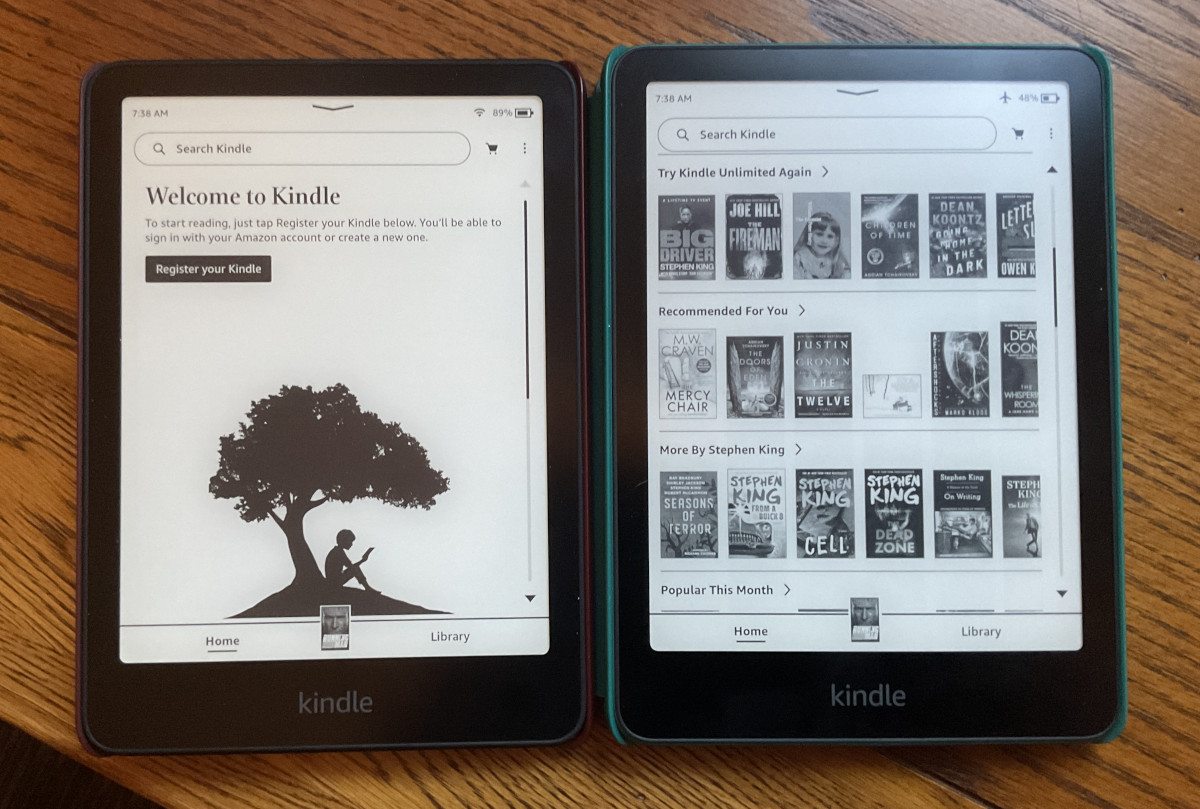
I came across a post on reddit yesterday about a new bug that breaks the home screen on Kindles, and I thought it looked like a good way to get rid of the annoying wall of recommended titles and advertisements on the home screen so I intentionally tried to replicate the issue and it worked—now my Kindle’s home screen shows the kid under a tree logo instead of ads for books I don’t care about.
The home screen on Kindles is basically useless anyway, and I usually avoid going to that tab at all costs, but I’m all for getting rid of that hideous ad-ridden home screen even if I don’t use it.
I’m not sure what else this breaks so try it at your own risk, but my 12th gen Kindle Paperwhite on the latest 5.18.6 software seems to work normally otherwise. The library tab still works like normal, and I can read books and download new books. But I did notice it also broke the send-to-Kindle email under settings—it now says unavailable. Update: Don’t do this! It’s a month later and now my Kindle is having other problems and a factory reset did not fix it, and now the Devices page won’t load at Amazon so I can’t change the name back.
If for some reason you want to break the home screen on your Kindle too, all you have to do is go to the Manange Your Devices page at Amazon and select your Kindle device, and then edit the name of your Kindle to include an emoji. Just copy an emoji from Google search and add it to your Kindle’s name and that’s it.
After that’s done, go back to your Kindle, hold down the power button for a few seconds, select restart, and that’s it. Your Kindle will boot up with a broken home screen.
Don’t bother trying to register your Kindle from the new home page because it won’t work.
Even though it’s completely non-functional, I still prefer this broken home screen to the real home screen on Kindles. I plan to keep it that way and see how long it takes for Amazon to fix the emoji bug. Finally a Kindle bug we can use to our advantage. 😀
Of course, everyone has their own preferences. In the Library, which is the view I use as my home page, I only have downloaded books. So I’m interested in keeping the home screen (even though I don’t see it) because the latest books sent also appear there. But everyone organises themselves as they wish (and are able to).
That’s funny. I will keep my home screen intact as I use the recommendations as a way to discover new books, but I’m glad this bug is out there for those who dislike the home screen. It’s such a minor thing, I can’t see it being a top priority for the next update.
Sounds like what I want!
Geez, just use a jailbroken kindle already. There is a way to launch KOreader without the kindle software or firmware framework so I am always in KOreader.
I use this Kindle to test software updates so it’s well past jailbreaking methods, and I prefer to use the native Kindle software since KOReader doesn’t support library ebooks, and I’ve always been too lazy to embrace the workflow of having to remove the DRM from every ebook first and having to sideload them before being able to use KOReader. The Kindle OS is a lot more convenient. I have KOReader installed on my NXTPaper phone though and use it sometimes. I can see why people like it.
I actually like the home page as it also gives me ideas for books to read with kindle unlimited. I have my account settings to the genres that I prefer, so I don’t see romance novels. But hopefully this will be a ‘feature’ that others can take advantage of.
I also kinda hate the homepage. The “books” it recommends me are all trash and I have no intention of reading any of it. Plus the UI of it is just awful. I only ever use the Library tab. Kindle should really learn from Kobo how home should look like.