
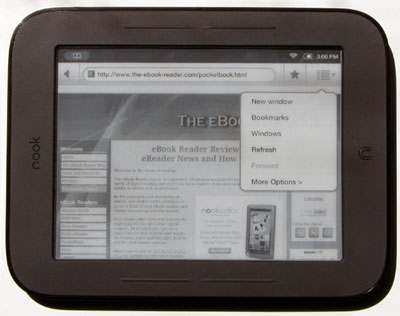
So it turns out that you don’t even need to root the new Nook Touch to get a web browser, it has one hidden in the search feature.
It’s true. All you have to do is hit the little “n” icon below the Nook Touch’s screen, tap the search icon, then enter a url into the search (just end a word with .com, .net, etc), and suddenly a hidden web browser launches! Take a look…
The Nook Touch’s Hidden Web Browser
It’s a lot like the Nook Color‘s web browser, but unfortunately it doesn’t work nearly as well. Scrolling, zooming, and activating hyperlinks are hit-or-miss, and pages don’t load half the time. I tried downloading an EPUB from Feedbooks, the download worked, but the ebook would not open.
On the positive side, the menu system seems to work well. You can move between different windows, find on page, add bookmarks, adjust the settings—landscape mode even works.
Overall, though, it needs a lot of work—probably why Barnes and Noble never mentioned it. It does show some promise though. I can’t wait until the Nook Touch gets a working web browser via hacks, plus the ability to run other Android reading apps—it’ll happen sooner than you’d expect. Someone already has Angry Birds running on a rooted Nook Touch—even if it only barely works it is progress!
What I am curious to see is whether I can drag the instapaper bookmarklet to a bookmark toolbar (If there is one). I thought I was getting my Nook today, but it looks like UPS handed it off to the Post Office,
I assume we will find a lot of the Nook Color OS buried in the Nook Touch, helps cut development time and also leave potential to open with relatively small firmware upgrades.
@John: Both devices are running Android, so yes, they do have pretty much the same OS. Android is based on Linux. The difference is in what apps they include and how locked down different functions are.