
• Skip to main content
  • Skip to secondary menu
  • Skip to primary sidebar
  • Blog
  • Kindle
  • Onyx Boox
  • Kobo
  • Comparisons
  • Contact
  • About
  • Disclosure
The eBook Reader

The eBook Reader

The eBook Reader Blog

  • News
  • eBook Readers
  • Sales & Deals
  • Reviews
  • How To Guides
  • eBooks
  • Free eBooks

Amazon Adds New Way to Access Kindle Notes and Highlights

June 7, 2017 by Nathan Groezinger

Kindle Highlights

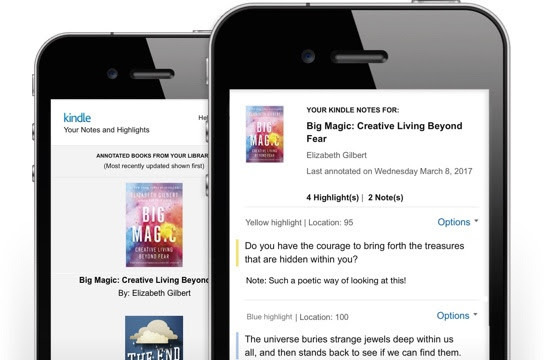
Yesterday Amazon started sending out emails to Kindle customers about a new way to access notes and highlights added to Kindle ebooks.

They’ve introduced a new mobile-friendly web page that works especially well on phones and tablets, and they’ve added thumbnails for each book, unlike the old highlights page that was just a wall of text.

Here’s where you can access the new page for your Kindle Notes and Highlights.

The old page is still accessible for the time being, but it will no longer be available after July 3rd when they officially switch it over.

The new page has a nicer layout that makes it a lot easier to navigate and find notes for specific books.

You have the option to add notes and delete highlights, you can copy and paste them, and select to open the noted section in the Kindle book.

Amazon suggests bookmarking the page for easy access; I’m surprised they didn’t make an app for it. The exact url is below:

https://read.amazon.com/kp/notebook

Filed Under: Amazon Kindle

Disclosure: This website earns commissions using affiliate links through Skimlinks and Amazon's Associates program.

Reader Interactions

Comments

  1. Laura says

    June 7, 2017 at 8:30 am

    Your link for the old page is to the new page too.

    • Nathan says

      June 7, 2017 at 9:00 am

      Fixed! Thank you. 😀

  2. Bob says

    June 7, 2017 at 7:35 pm

    Ha, I didn’t even know it was there and had a few notes on one of my books I needed to correct. 🙂

  3. Graeme says

    June 10, 2017 at 10:03 am

    If readers want to get Kindle highlights with print-edition, page-numbered, in-text citations – try Note Hound.

Primary Sidebar

Kindle Sale

Unusual Sale on Kindle Bundles for Valentine’s Day

Kobo Sale Valentines

Kobo eReaders Now On Sale for Valentine’s Day – With a Weird Twist

Kobo Multiple Libraries Login Fix

New Way to Use Multiple Library Cards with Kobo eReaders

Fig Kindle Scribe Colorsoft

Red (Fig) Kindle Scribe Colorsoft Now Available to Order

Kindle-EPUB

Amazon Needs to Show Which Kindle eBooks are Available as EPUBs

Navigation Menu

  • Homepage
  • The eBook Reader Blog
  • Comparison Tables
  • Kindle Comparisons
  • Best eBook Readers
  • Reviews
  • How To Guides

Follow

Site Search

Copyright © 2026 · Magazine Pro on Genesis Framework · WordPress