
Amazon has started slowly rolling out some new changes to the user interface on Kindles after the last 5.18.6 software update.
Last week I posted about how they changed the look of the table of contents menu and the dictionary panel (they also removed the ability to open the dictionary as a book when looking up definitions, which is annoying for some). They also changed how bookmarks work.
Like usual, Amazon didn’t bother mentioning the changes in the release notes, or explain how things are supposed to work now, leading to more needless confusion from Kindle users.
I did get a popup saying that bookmarks had changed when trying to add a new bookmark, but if you already had bookmarks added you wouldn’t know where to find them now that they’ve removed the bookmark icon from the menu.
The way bookmarks work now is you have to tap in the upper right corner of a page to add a bookmark. You no longer have to tap the icon and then the + button to add a bookmark; just tap the corner once and that’s it, so it requires less taps than before, which is nice.
However, you can no longer view your list of bookmarks by tapping the bookmark icon in the right corner. As noted above, they also removed the bookmark icon from the menu bar so you cannot access your list of bookmarks from there anymore either. It’s no wonder some people think that Amazon has removed the bookmark feature entirely with this latest software update.
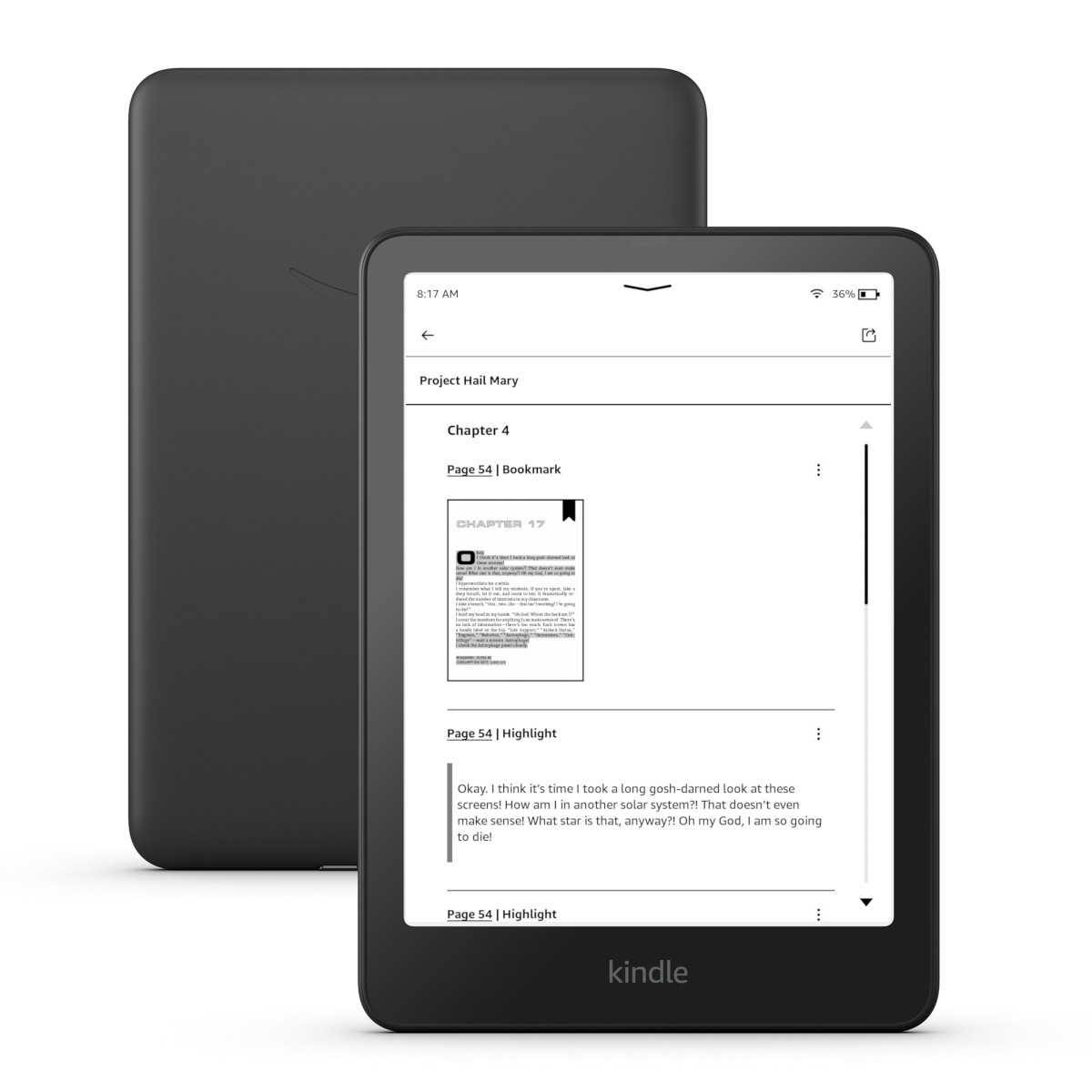
To view your list of bookmarks you now have to tap the notebook icon from the menu bar. Instead of being able to just view your list of bookmarks, they are now mixed together with all your notes and highlights.
I like how the bookmark list shows thumbnails for each bookmarked page, but having to sift through your notes and highlights to find bookmarks is less than ideal. They should add a filtering option, but so far that doesn’t exist.
With the new Kindle Scribes getting released on the December 10th, Amazon will probably start rolling out another software update soon, and there might be some more UI changes to accomodate software changes on the new Scribes. I bet that’s why the bookmark menu has been consolidated into the notebook menu, and I wouldn’t be surprised to see more changes coming down the line.
That’s the impression I get. I think they’re adapting all models to the software that the new Kindle Scribes will have (obviously, some features won’t be available). I’m convinced there will be more changes. I know a lot of people won’t like it, but I prefer to have more or less unified software.
I open the dictionary as a book pretty often when looking up words. I hope they bring it back. I don’t understand why amazon keeps breaking things that have been working perfectly fine.
You can send feedback from the settings menu on your Kindle under “help”. I think the software developers miss some of the details like this, but they’ve been receptive to bringing back missing features in the past. Like one of the recent updates messed up the variable line indicators that show how long ebooks are compared to each other in the library view. They were all the same size for a while but now they’re back to being different sizes depending on the length of the book.
also please dont forget to mention that once you tap the notebook icon you have to wait several minutes(!?) while your annotations load.
this whole change is gross and completely unnecessary. if anyone has more than a few highlights (like in a bible for instance), bookmarks are virtually completely unuseable. not sure what they were thinking here. i hope there are some new updates that bring bookmarks back. i cant believe that that whole feature of being able to jump around with bookmars is just gone. :-/ sad
The original Kindle also only made you tap once to bookmark. I actually hated when they changed it to need multiple taps.
I’m not sure after this if Amazon even understand how bookmarks are being used.
They don’t. I hate the new changes. When you could view a list of your bookmarks it was easy to go back if need be. Now it’s a multiple step process just to find one. Also…at the end of a book I like to remove the bookmarks and set it up fresh. Can’t do that either without a multi-step process. Idiots!
Bookmarks are (were) a feature that I used DAILY. Not anymore. It’s beyond cumbersome – it’s unusable for those who also have a lot of annotations. I’m now going to look for an alternative to Kindle or just quit using it. And forget giving one as a gift!
It makes me so mad because my kindle holds my Bible, which I have many highlights and bookmarks, which I use MANY times, now I cant swap from book to book on my Bible and its really frustrating.
I have found a way round it. I have an iPhone with the Kindle App. I bring up the book on there and as it syncs with the kindle I can bookmark my page on my iPhone.
Really miss having the bookmark on the kindle.
ty that works. every night I have to read several chapters to find my place because they took away the bookmark. I now se a bookmark on the last read page. ty very much
Who asked for this? I had my kindle on airplane mode till around 2 days ago. Purchased a new book today and got this update that has made me so happy that im here to speak about it. Please scrap this crap 😭
I agree with many writers. In an electronic book, ease of use with bookmarks is essential. The new format is awful. Will be looking for an alternative to Kindle. Will not buy another Kindle book.