
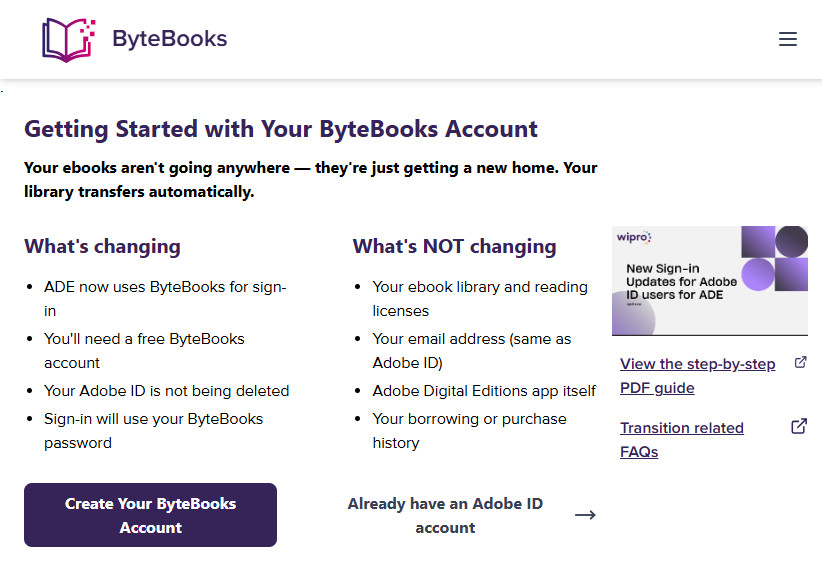
If you use Adobe Digital Editions (ADE) to manage your purchased ebooks, you might be asked to sign-in using a new system at some point in the future that requires setting up a ByteBooks account, and it’s recommended to use the same email account you used with Adobe.
Adobe has “transitioned” their ebook platform to a company called Wipro Engineering, and they’re going to be handling “future releases and technical maintenance” moving forward.
For the most part, it doesn’t sound like this will be affecting current customers much, but the sign-in process is going to change. Instead of using an Adobe ID, customers will be required to authorize ADE using a ByteBooks account instead.
If your ADE setup is already authorized it should continue to work normally for the time being, but if you have to setup ADE or authorize a new device to use with ADE, you’ll have to setup a ByteBooks account and sign-in using that instead of your Adobe ID.
I can’t find a date saying when this transition is supposed to be completed, but eBooks.com has started sending out emails notifying customers about it, and they have this help page up with more information about the change: Adobe Digital Editions sign-in is changing: what eBooks.com customers need to know.
There’s also this help page on the ByteBooks website with some additional details about the sign-in change: ByteBooks Transition Help.
There’s a help article on Adobe’s website as well so you know it’s not some kind of new scam: Transition of Adobe eBook platform to Wipro Engineering.
So far the sign-in process appears to be the only thing that’s changing, but it makes you wonder what other changes could be coming in the future. Adobe had been neglecting their ebook platform for a long time, and ADE uses an outdated DRM system that’s pretty much pointless since it’s so easy to break.
All I know is that Adobe Digital Editions on Mac is not an Apple Silicon (ARM 64) application and that next year or so, it won’t work anymore. Adobe has to update its app. On Windows on ARM too, I guess.
Oh dear! TRUE! I’ve just checked, on my Mac this is the only x86 app installed,
I tried to transfer my ADE account to ByteBooks, but the page says there is no ADE account. I copied the e-mail address from my verified adobe digital editions on my computer. The customer support either suggests to re-check that I typed in the correct e-mail or ghosts me. It is most vexing.
I am looking into solutions to remove DRM from the books I bought, as I fear I might not be able to open the books I paid money for anymore (latest once I need a new computer).
If you buy ebooks from Kobo I would suggest using the Obok plugin because it doesn’t require using ADE at all. I’ve always hated ADE and refuse to have it installed on any of my computers.
I tried converting an old ID that I have not used for years; with it, I could authorize ADE, but it would not open any of the books that had used it. Nor could I re-download these books. Error: check authorization. Since I thought maybe this old ID was inactive, I created a brand new one, bought a trial cheepy book and tried to download it with this new ID. Again same error. This is horrifying!
I wrote to support@wipro.com; it bounced. I then wrote to ebooks-support@ wipro.com. No response even after a few days.
Interestingly enough, after authorizing with that old converted ID, I could then run deDRM from calibre to open old files, even though ADE refused to.
Update to my previous comment:
Wipro.com did reply to my request within a day, but since it landed in junk, I missed it at first.
They suggested I update my ADE since I was using a very old one. I have always avoided this because it might cause deDRM problems. However, I tried it, and indeed things then worked fine, even deDRM.
I still have to check the eBook reader but since I normally only read deDRM-ed books, this is not so important to me. But I expect it will work.
every time i try to create an account, i get error 403.
I have got the same problem. Tried in different browsers, same result.
Who will help us out?
I wondered why I was getting spam emails from my unique email address for Kobo. Of course is it not unique only to Kobo but to Adobe AND NOW ALSO WIPRO.
Why has Adobe not updated all ADE user email with this significant change?