
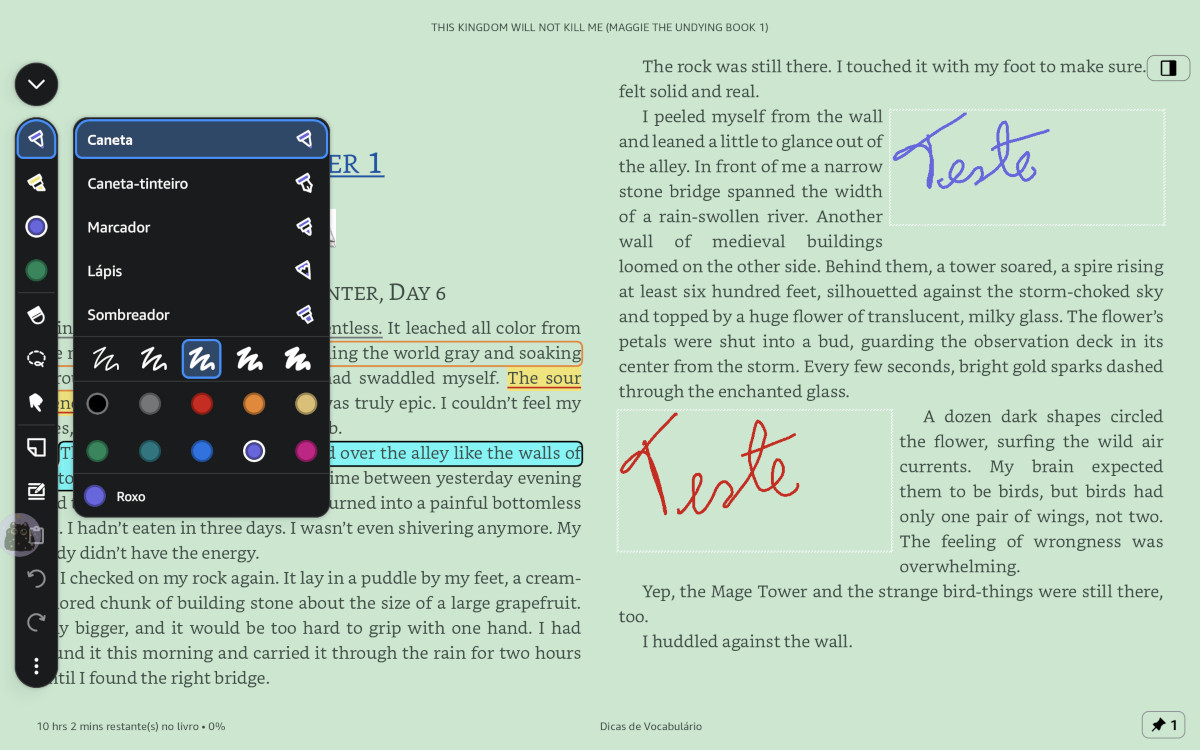
Amazon recently updated their Kindle Android app to add some new notetaking features for ebooks. If you have a device that supports using a stylus, the update basically turns the Android app into a Kindle Scribe, at least when it comes to annotating ebooks.
I don’t have an Android phone or tablet that supports this so I can’t test it myself, but someone posted some pictures on reddit showing how the new notetaking features work.
According to this page at Amazon, the stylus-supported version of the Kindle Android app supports handwritten sticky notes, active canvas notes, and margin side panel notes. It also supports regular text notes, highlights, underlines, and outlines like the regular Android app (some of those features are new too).
Amazon’s new Alexa Tablets added support for writing on Kindle ebooks with the new Pro Pen so it isn’t surprising they ported those features to the Android app too, but it is kind of surprising how fast they released the update.
The handwriting features will probably make it over to the Kindle iOS app too eventually, but so far I haven’t seen any reports of that happening, and the page at Amazon just references the non-stylus supported iOS app for now.
I wonder if these new features will work on Android ereaders with stylus support, like Onyx’s eNotes and ereaders. I have an old Boox Note 2, but it doesn’t support Google Play so it would be a hassle to get the latest version of the Kindle app installed on it. Has anyone gotten these new features to work on a Boox device? I have a feeling stylus support won’t be recognized by the app without some kind of workaround since Onyx’s eNotes aren’t officially certified.
Does the Kindle app for Android tablets support the Group by Series feature again, or is it still not working?
It works fine on my Android phone and tablet.
I still have the 8″ Kindle Fire, and the Group by Series feature doesn’t work at all. I was thinking of trading in my Kindle Fire 8″ for the Alexa 12″ Pro tablet with the nanomatte screen, but only if the Group by Series feature works. The Group by Series feature works great on my iPad Pro. Then again, I might just upgrade my iPad Pro. I like that the iPad Pro has cellular capability. I am surprised that Amazon did not release all of their new Alexa tablets (by size) with 5G connectivity, the same Dimensity 8400 chip, 8-16GB of ram, 256GB-512GB of storage and the nanomatte screen. These would have been great alternatives to Kindle E-Readers if Amazon have given them more thought and options.
Yes Nathan it works in my Boox max lumi 2 which runs Android 11 with the Boox stylus but compared to the native note taking app there is an obvious lag as expected from third party app for writing in an Android e ink device.
I tried this on my old Likebook P101 but it didn’t work. Turns out the Amazon no longer supports Android 8.1. I can’t even download Amazon books to it anymore. This would have added some life to my tablet but I was wrong. And there isn’t a way to upgrade the Android version in my tablet. So very sad.
I checked this summer, and you need Android 10 to install Kindlel and Kobo apps. Last year it was Android 9.
But my local library (European) only need Android 5 to work. So maybe you can use it to read library books?
Judging from the picture, there’s still no doodling overlay. What’s the point of circling a word or two if it ends up with a box and circle that aren’t linked to the exact words intended? The Boox PDF note editor offers this feature. Is it really that complicated?
It can do what you want. You just touch a word, and a bar will appear with choices. One is note, which will allow you to doodle or type in text. This will be attached to the word.
I’ve tried this, and it’s not what I want. You can use a pen to circle words, but the final result appears as a slightly rounded rectangle. To be fair, Boox Neoreader does a much better job—unless you change the font properties for EPUBs.