
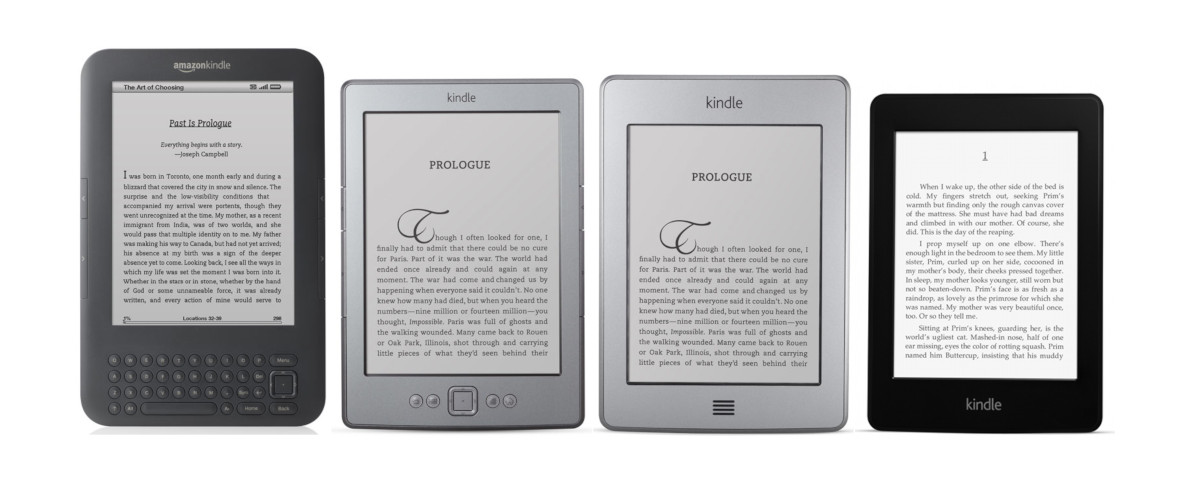
Amazon is going to be ending support for the first five generations of Kindle ereaders on May 20th, 2026. If you’re unsure if your Kindle is getting cut off from Amazon’s services, there a few tells that can determine that pretty quickly.
First off, if your Kindle doesn’t have a touchscreen, it’s getting axed. Second, if it has a single button below the touchscreen, that would be the Kindle Touch—it’s getting the axe too. The last one, the 1st Kindle Paperwhite, is a bit trickier (we’ll get into that more below).
Here are a couple of relevant help pages at Amazon if you want to go directly to the source for more information:
Kindles End of Support Page
How to Identify Your Kindle Model
No Touchscreen = End of Support
This one is really easy. If your Kindle doesn’t have a touchscreen, then it’s on the end-of-support list.
It doesn’t matter what generation it is or what year it was released. If it doesn’t have a touchscreen its window is getting closed on May 20th.
Kindle Touch = End of Support
The first Kindle to have a touchscreen was called the Kindle Touch (a creative genius thought that one up). It was released in 2011, and it was only available for one year. It has a grayish/silver color (pictured third from the left above).
This model is easy to identify. It’s the only touchscreen Kindle to have a single button centered below the screen (3 lines that act as a single button, to be specific).
Kindle Paperwhite 1 = End of Support
The first Kindle Paperwhite is the trickiest to identify since it looks exactly the same as the Paperwhite 2 and 3. It’s also confusing because Amazon calls it a 5th generation Kindle, even though it’s the first “Paperwhite” model.
One quick way to tell is to go into settings and check the software version. The Paperwhite 1 topped out at 5.6.1.1. That’s the number you should see unless it hasn’t been updated. Anything above that proves it’s a newer model that’s still being supported. If it’s lower than that number, move to the next step.
One sure-fire way to determine your Kindle’s exact model is to check the serial number on the back of the device. If it starts with any of the following set of digits then it’s a 1st gen Kindle Paperwhite that’s losing support:
B024
B01B
B020
B01C
B01D
B01F
See this Kindle Serial Numbers page for more details about each model.
Uses for End-of-Support Kindles
It’s important to note that these older Kindles will still be usable to some degree if the battery holds a charge and the Kindle turns on and works:
- You will still be able to read any ebooks that you downloaded before May 20th.
- You will be able to sideload ebooks from a computer using a USB cable, provided they’re in a compatible format (if not, use Calibre to convert them).
- Deregistered Kindles can still be used for sideloading.
- You can jailbreak your old Kindle to add more functionality to it.
Do not factory reset your old Kindle after May 20th if you still want to use it to read the books you downloaded from Amazon. You will not be able to register it again after that date; it will be locked out of your existing Kindle library permanently.
Nathan, do you know of a reliable place to get replacement batteries for Kindles?
Thanks in advance.
That’s actually a rabbit hole I’ve never been down so I don’t know what the best source is these days. I was planning on replacing the battery on my Kindle Voyage eventually, but then I accidentally broke it.
Google is your friend. Replacement batteries exist but– reportedly — replacement varies in complexity based upon the specific model; some are easier than others.
When I looked into a replacement battery for a DX, I found one for $40 but the diy instructions didn’t sound at all user-friendly and the site was sketchy, at best.
As I recall, iFixit was of no help.
I got a replacement battery for my Keyboard from eBay, and have had good luck with that. 🙂
Same here. I’ve replaced eight or nine Kindle keyboard batteries, all purchased from eBay for about $16, with good results.
So I relied on Amazon having told me my device was unsupported yet the information above tells me that I have a sixth generation kindle.
Either Amazon don’t know what they are doing or the article is incorrect.