
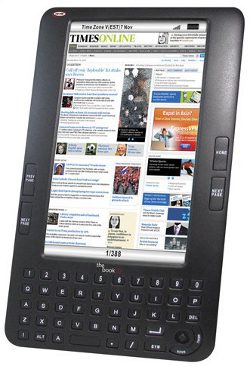
(Update: The full written review for this device is now finished and is located on this new Augen The Book Review page.)
“The Book” has a lot of interesting and advanced features; if everything works as listed on the spec sheet, at $129, this could be a great deal. The only drawback is that the device has a 7-inch LCD (TFT) screen with a pixel resolution of 800 x 480, so it won’t have great battery life like E Ink ereaders—the spec sheet says up to eight hours in reading mode, 4-6 using other applications.
The Augen ebook reader is being marketed as an ereader, video player, and word processor rolled into one. It has Wi-Fi built-in, a full web browser, an open-source SDK, and supports Adobe DRM. It comes with a leather cover, 2GB of internal memory, and has an SD card slot for cards up to 32GB.
Here’s a look at the owners manual for the Augen ebook reader, via The Shopping Channel.
Interestingly, the manual insinuates that the device comes with Calibre on an install disc to use for managing your ebook library.
Augen “The Book” Specs
- Screen: 7″ diagonal 800 x 480 pixels color TFT.
- Built-in 802.11 b/g Wi-Fi.
- Web browser.
- CPU: Ingenic 4755, Arm9 400 Mhz.
- OS: Linux 2.6.24.
- Open-source SDK.
- 2 GB internal memory, SD card slot up to 32 GB.
- Full QWERTY keyboard.
- Includes WordPad for note-taking and text editing.
- Text-to-speech supported.
- Portrait and landscape modes.
- Built-in speaker and headphone jack.
- Comes with leather case.
- Dimensions: 8.89” x 5.12” x 0.51”.
- Weight: 10 ounces.
- Comes with 150 free classic ebooks.
- Text formats: Adobe EPUB and PDF, TXT, HTML, CHM, RTF, FB2, and MOBI/PRC.
- Image formats: JPG, BMP, GIF, and PNG.
- Audio formats: MP3, WMA, FLAC, and AAC.
- Video formats: WMV and MP4.
Nice how the cover straps cover the buttons. Thats a bad sign.
I noticed that too. And it covers a large part of the screen on top. It’s probably just a prototype design that they’ll change before the release . . . hopefully.
Hello,
I’m thinking of buying one of those ereaders, but i really like to read in bed, and i need one that i can read in darkness, could you guys help me?
Thanks.
xD
If you want to read in the dark then you’ll need one like the Augen, Pandigital Novel, or iPad that has a backlit LCD screen, or you’ll need a reading light for an E Ink ereader like the Kindle, Sony, and Nook. It all depends if you prefer reading on an LCD screen or an E Ink one. Many people don’t like reading on LCDs because they can cause eyestrain and the battery only lasts a few hours. But other folks prefer them. It’s all a matter of taste.
Ok, thanks Nathan.
I went to the Augen website this morning and had a live chat with one of the tech reps re this product. I’d like to update a few things that are on this site:
1. The case has been changed so it no longer covers the screen and buttons.
2. The unit accepts SD cards up to 32gb.
3. Although it is not indicated in the user manual, one can listen to music while reading.
4. The user manual has been updated, so the link on this page does not contain correct information.
For more info, go to the Augen site and click on Support. From there you can get to a live chat option and ask all those pesky questions.
Thanks for the updates!
It goes on sale for $89.99 at Kmart—Sunday, July 18. I called my local store and it looks like they have 3 in stock.
Just went to their site and tried to click the links at the top, all 404’d. I’m getting flashbacks of delstar openbook here.
I just stumbled on your blog today as I was searching for eBook info. Great site, good reviews, nice human touch. I am going to put a link on my blog to yours. You have some great information.
Thanks,
Bill
I bought one and took it back for a refund. Found lots of issues.
1. The wifi interface is not configurable and the range is horrible. Connection rely on DHCP being active and it appears ready to hook up to only unsecured wifi hotspots. I needed the MAC Address to enter into my wireless router as I have MAC address filtering activated. The MAC address was blank in the System Info screen. So, I tried tech support. Really hard to get an answer from them, but perseverance won out.
2. The tech support staff was not very helpful. The first guy told me to download a patch from
http://rapidshare.com/files/408236101/EBA701_V6_0721_-MAC_address.zip.html . Well I got the patch and the instructions (Readme file) may as well have been in a foreign language. None of the instructions worked. Some of the file referenced weren’t in the zipped file. I carefully typed each command line and triple checked it before entering. I could not get the patch to work even with – my second call to tech support. This guy wasn’t helpful at all. Also, I was wondering why, AugenUS.com would have a support page with a folder for The Book but you have to go to rapidshare to get the patch. Why have to go to a site that throttles download speeds unless you pay for their service when you have a web site that can be used.
Bottom line on patches and firmware upgrades, if you are supporting GUI machines make the installation GUI also.
3. The user manual that comes with the product is also woefully lacking and had two errata sheets inside the manual that you could not read without a magnifying glass. The online version include in The Book was equally unhelpful with the machine’s operation.
4. I could get the USB connection to connect to a Vista Operating System, but Windows 7 wouldn’t connect.
5. I tried two different SD memory cards and it did not recognize either (one 8GB SanDisk and one 8GB PNY), although when I insert then in my computer they worked fine.
6. The case is a wonderful idea, but some sort of pocket to hold ear phones, the USB cable and the power cord would be nice.
7. A cigarette lighter adapter for a vehicle would be a good idea also as well as headphones. Guess they needed to keep price under their $100.00 market survey.
8. The switching display from landscape to portrait is wonderful, but it’s too touchy. Barely move the device and it switched from one mode to the other.
9. There joystick button when press only sometimes acts and the enter button.
10. The power button is difficult to get and should possibly be put on top near the keyboard. But this is a minor inconvenience.
11. The reset button and access hole could be a bit bigger. I couldn’t even get a normal paperclip in the hole when the tech told me to reset the device.
Maybe The Book II will fix some of the problems if they ever release one.
I just got this ebook today, but when i tried to connect to wifi it said “check dhcp enabled” or something along those lines. What does it mean?
Can i buy books for a kindle on amazon.com and put it on the book by augen? On the Book I clicked on the Buy books button and the site for it came up. I looked for the books I wanted and they didn’t have any… but they have the books at amazon. Or are there any other sites that would work to put books on my Book by augen??
Amazon’s ebooks only work on the Kindle and Kindle apps. Once you setup Adobe Digital Editions on your computer and authorize the Augen it will read ebooks with Adobe DRM from the websites on the ebooks page that lists EPUB.
I received the Augen “The Book” for my birthday, and I haven’t been able to find the 150 preloaded books. I don’t know if i have to download them or what? Can anyone help me with this??
Kelsey,
The 150 books can be found under “Library” and then “Free eBooks”.
And did anyone answer the earlier question about DHCP? I get the same message when trying to connect to some un-locked WIFI: “check dhcp enabled”
Does anyone have the answer to the earlier question about DHCP? I get the same message when trying to connect to some un-locked WIFI: “check dhcp enabled”. I called the help desk and they told me to return it to where I bought it because it is defective. That sounds crazy….. PLEASE HELP, SOMEBODY
HELP! I can’t get The Book to do anything. When I try to connect to WiFi it says to check dhcp is enabled. I tried to put a couple of free books on it and it says something about DMR. Even in Adobe it says unsupported format. Once it gets set up it may be nice but this is a nightmare.
HOW CAN I DOWN LOAD ANYTHING TO IT?
Wow, it’s been exactly one year since this post was made. As far as I can recall, you cannot really download anything to it unless you want to spend a lot of time messing with the wonky web browser. Mostly you have to sideload content onto it via USB or on a memory card.
I HAVE managed to download Windows programs on THE BOOK, both in its memory and on an SD card and then transfer them to my PC to run them!! In fact, you CAN download just about anything onto it as long as you have enough room either in its memory or SD card. Just don’t expect to RUN everything you download on it on itself. You CAN also use the keyboard to type things on websites. Don’t expect to watch YouTube videos on it as YouTube will tell you that your browser is too old.
Tengho un Eboog Augen desde hace dos semanas, esta buenisimo, con los libros gratis, mas los que cargue yo, fotos, videos, todo funciona, WIFI tambien y me conecte a internet ( una vez se tildo ). }ahora leia un libro y se quedo en una pagina y no se mueve ni para atras ni adelante, apago el ebook y al rato lo enciendo y ahi esta la pagina congelada, que hago por favor si alguien me ayuda. Gracias
I cant get the stupid browser to work. All i get is dhcp enable or whatever the mumbo jumbo and getting to the support page for augen all you get is error 404 or whatever. they don’t have a support office in africa so what do i do?
I’m pretty sure Augen went out of business some time back. I haven’t heard of that problem before; maybe there’s something that has to be adjusted in settings.
Does anyone know how to delete books and music from memory of TB I am having nothing but trouble and can not find a manual online.thanks
Would we all stop pretending that this is an e-reader?
This a tablet being sold as an e-reader. Period.
We just made a mistake it seems by purchasing a “never used, in the box” new Augen GenTouch model NBA7800ATP for $50. Turns out (we find out after the fact) that we can not even access the http://www.augenus.com web-site as the company has closed. Must have been a one-day wonder. Apparently the “patch” is on that web-site that has been shut-down (as well as the company). So, our “deal” turned out to be a waste of money. Anyone have suggestions in getting this to work right or the patch? (The patch is from the augen web-site too at http://augenus.com/gentouch78patchv2.zip (which you cannot access)). Word of advice, don’t buy this if you find one!
Try running a search over at the XDA forums, Slatedroid, or some other tablet-modding site and you can probably find what you are looking for, or at least some alternate software that’ll work.