
A new software update is now available for all Kindles released since 2024 that adds some new features and brings back an old feature that got removed several updates ago.
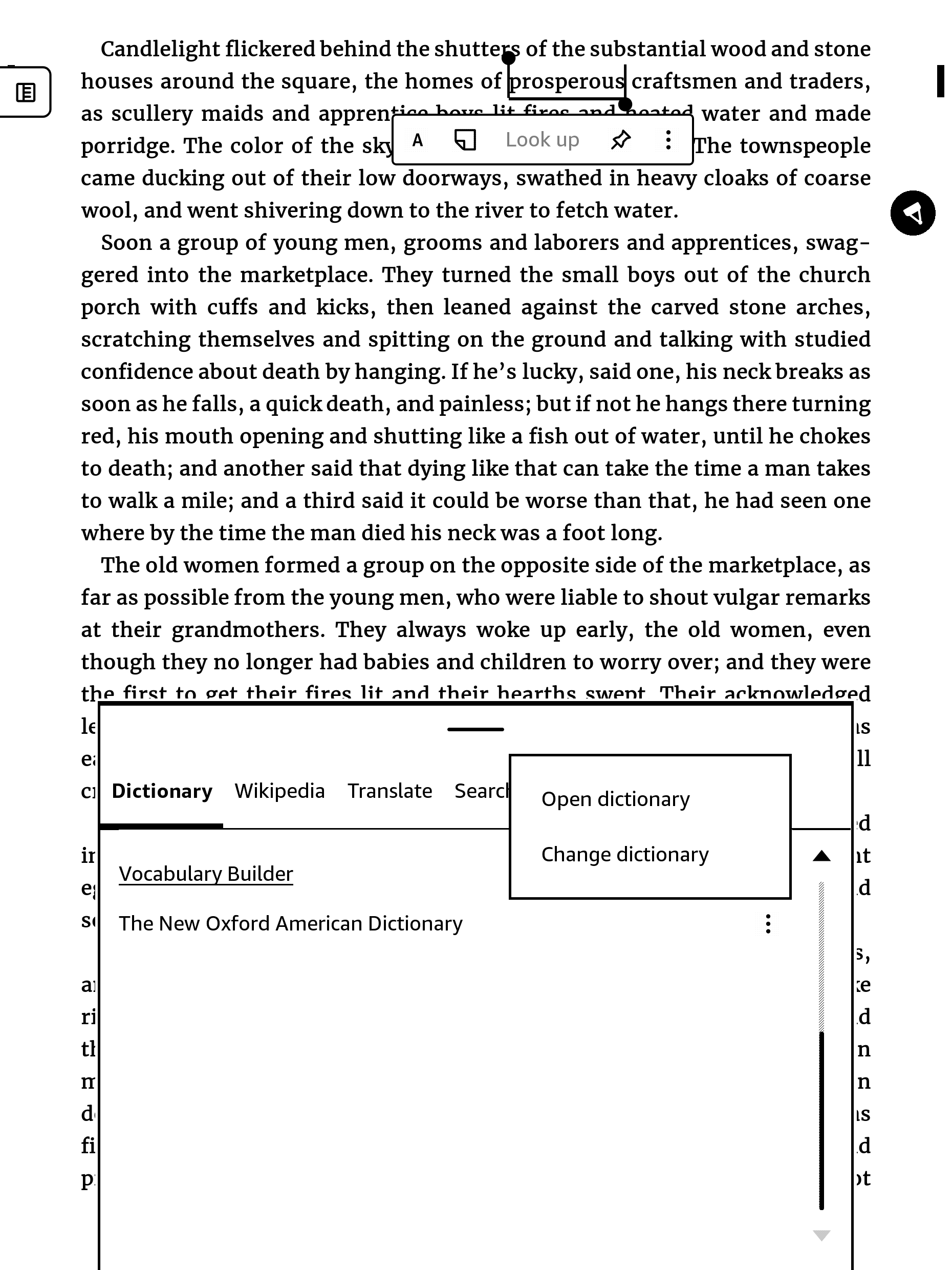
The option to open the full dictionary when looking up words while reading has returned, but it’s a little different than it was before. Now you have to scroll to the bottom of the dictionary window, then tap the stack of 3-dots next to the dictionary name, and select “Open dictionary”.
I tested this out on my 1st gen Kindle Scribe, and while it’s nice to have that feature back, the dictionary is much slower to open now, and having to scroll to the bottom of the dictionary window takes more time.
On my Kinde Scribe, the dictionary now takes a solid 5+ seconds to open, and the screen flashes a few times for no reason, and it takes several seconds to go back to the book as well. On my Paperwhite with the older software before they removed the feature, the dictionary opens in less than 2 seconds with no screen flashing, and going back to the book takes only 1 second.
In fact, it’s not just the dictionary that’s slow with the new 5.19.5 software. Opening ebooks now takes several seconds, and page flip view takes longer to load. Maybe it’s just because my Kindle is still indexing after the update, but so far performance has definitely taken a noticeable dip.
Like always, you can download the update from the Kindle Software Updates page at Amazon and install it manually, or you can wait for the update to automatically install on its own, but that can sometimes take several weeks or even months. If you don’t want the update, the only way to avoid it is to turn on airplane mode and leave it on, or you can deregister your Kindle. If your Kindle is jailbroken there are other options.
They actually updated the release notes for the update this time, and the date of release is accurate for the first time in ages. These are the notes for Scribes; regular Kindles just have the notes about Story So Far and Bookmarks in page flip view.
5.19.5 Release Notes
Version 5.19.5 – June 2026
Here’s what’s new:
Story So Far: You can now easily return to books you love without backtracking through chapters by accessing spoiler-free recaps up to where you’ve read. Story So Far is available for thousands of best-selling English language Kindle books you have purchased or borrowed.
Moving sticky notes: Move any sticky note by tapping and holding the icon with your finger, then dragging it around on the page. Or, select the “Move note” action in the 3-dot menu in the sticky note dialog or side panel note.
Structured outlines: You can now draw circles that automatically snap to neatened annotations in eBooks with enhanced typesetting and Word documents.
Bookmarks in Page Flip View: In addition to tapping in the top right corner while reading, you can now create bookmarks by tapping on the bookmark icon in the page thumbnail, in Page Flip View.
Performance improvements, bug fixes, and other general enhancements.
I have updated both my new ColorSoft and PaperWhite SE and opening books and turning pages are still fast. But I don’t keep a lot of books on my Kindles. I have 12 books at most at any one time.
I downloaded and manually updated my Kindles.
Thank you for the info. Don’t you love when something says, “Performance improvements” and it runs slower?
I noticed on the last update that Amazon locked down the Assistive reader. Before it was working on all my books. Now it only works on Amazon store books.
Wouldn’t it be nice if they added a confirmation pop up window when you hit the power key? Just a simple “Confirm or Cancel” window for those moments when I unintentionally hit the power key.
Yeah, opening the dictionary is still painfully slow this morning so it’s not indexing. I just timed it and it took 8 seconds, and it keeps changing the line spacing setting and for some reason you can’t select custom fonts with the dictionary. And you’re right, Assistive reader does not show up with Send to Kindle books, but are you sure it ever did? Back when I reviewed the assistive reader it only worked with Amazon books.
You are probably right about the Assistive reader. I have been using Kindle Unlimited a lot. I do know that my old Kindle keyboard would play almost anything.
I also took 8 seconds on the dictionary. I do like that I can bookmark a page or use the highlighter.
For what it’s worth, assisted reading still works for Android Kindle app with send to kindle books. I’ve largely given up on using the Kindle e-reader version due to voice quality.
Yes, Assisted reader does work on the app and the voice quality is far superior.
My Colorsoft and Paperwhite are so much faster than my 2024 Scribe. It’s frustrating to swap between the two. Downloading books, navigating the UI, loading and opening PDF files, it’s all so slow. Reading a book or PDF and writing is fine and fast, but any other task is so slow.
I was debating trading it in for one of the newer Scribe models during the recent Prime sales, if only because the new models claim to be 40% faster. What stopped me was I’d still have to pay hundreds of dollars for another one. Not really a good time for such frivolity. If that same sale comes up again in the future, I might upgrade.
My Kindle Colorsoft SE and Kindle Paperwhite 12th SE have been updated to this latest update, but my Kindle library keeps disappearing on both devices. I have to restart both devices so that my eBook library returns. This happens at random times. The devices seem very delayed when conducting any action, and at random times, everything on the screen disappears. I have restarted both devices four times already today. What is going on?
Is anyone having problems with book covers disappearing on the latest Kindle update? It is only happening on my Kindle Colorsoft SE. My Kindle Paperwhite SE is working fine.