
• Skip to main content
  • Skip to secondary menu
  • Skip to primary sidebar
  • Blog
  • Kindle
  • Onyx Boox
  • Kobo
  • Comparisons
  • Contact
  • About
  • Disclosure
The eBook Reader

The eBook Reader

The eBook Reader Blog

  • News
  • eBook Readers
  • Sales & Deals
  • Reviews
  • How To Guides
  • eBooks
  • Free eBooks

Oyster Adds Web Reader to eBook Subscription Service

July 26, 2014 by Nathan Groezinger

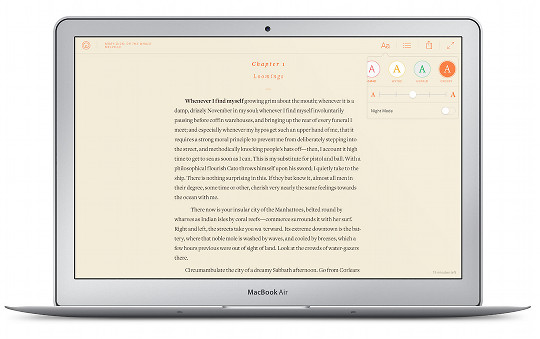
Oyster Web Reader

This past week Oyster, an ebook subscription service that grants subscribers unlimited access to a library of over 500,000 ebooks, announced the release of the Oyster Web Reader.

The Web Reader makes it possible to read Oyster’s ebooks from any computer or mobile device using a web browser. This adds to Oyster’s iOS and newly-released Android reading apps.

Oyster made the Web Reader so it displays ebooks like web pages. Instead of going page by page through a book, the Web Reader loads a full chapter as one page to scroll from top to bottom.

The Web Reader includes five reading themes, five text sizes, and night mode. Oyster also offers syncing across multiple devices.

Oyster is of course now competing with Amazon’s new Kindle Unlimited subscription service that also costs $10 per month, so it’s no surprise to see Oyster expanding to more platforms. Up until last month they were exclusive to iPads and iPhones. One advantage over Amazon, Oyster was able to reach a partnership with a couple of big name publishers.

Oyster also recently introduced the option to search their library of ebooks from their website to see what titles are offered in the program, and from there you can easily add ebooks to your reading list.

Filed Under: eBooks Tagged With: oyster, subscriptions

Disclosure: This website earns commissions using affiliate links through Skimlinks and Amazon's Associates program.

Primary Sidebar

Kindle Broken Home Screen

New Bug Breaks Home Screen on Kindles and Hides the Ugly Ads

Send Kindle Feedback

How to Complain to Amazon About Broken and Missing Kindle Features

Kindle Scribe Dark Screen

Why Did Amazon Make the Kindle Scribe’s Screen Look So Bad in Pictures?

Kindle Scribe Notebook Search

New Software Features Aren’t Coming to Older Kindle Scribes

Buy Old Kindles

The Secret to Buying Older Kindles for Cheap

Navigation Menu

  • Homepage
  • The eBook Reader Blog
  • Comparison Tables
  • Kindle Comparisons
  • Best eBook Readers
  • Reviews
  • How To Guides

Follow

Site Search

Copyright © 2026 · Magazine Pro on Genesis Framework · WordPress