
• Skip to main content
  • Skip to secondary menu
  • Skip to primary sidebar
  • Blog
  • Kindle
  • Onyx Boox
  • Kobo
  • Comparisons
  • Contact
  • About
  • Disclosure
The eBook Reader

The eBook Reader

The eBook Reader Blog

  • News
  • eBook Readers
  • Sales & Deals
  • Reviews
  • How To Guides
  • eBooks
  • Free eBooks

B&N Updates Nook App for iPad and iPhone

December 16, 2014 by Nathan Groezinger

Nook Stacks

Barnes and Noble has finally updated their Nook App for iOS devices. It’s been almost a full year since the last update, so better late than never, I guess.

The new software version 4.0.0 adds support for iOS 8, Apple’s latest mobile operating system. It was released 3 months ago so it’s about time B&N added support for it.

B&N also added a few new features and made some changes to the user interface to increase speed and overall performance.

You can now test drive the Nook app without signing in, and it comes with three free magazines and three free ebooks.

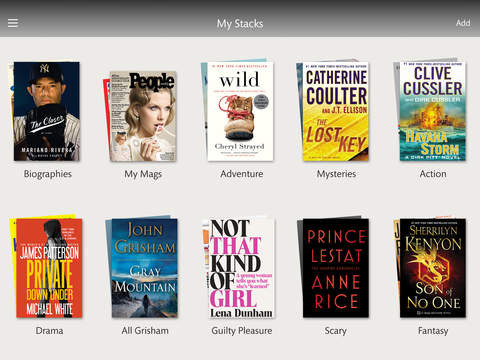
A new sorting feature called “My Stacks” lets users organize their library by creating stacks of ebooks, periodicals, and personal files. The screenshot above shows an example of My Stacks.

Another new feature, B&N added “Sample Search”, which lets you search specifically for free samples of books.

Other new features include refresh to sync content, notifications for new books and magazines, full screen mode has been added for PDFs and magazines, and they made it so that you can send feedback by shaking your iOS device, so if the Nook app isn’t working how you want it just shake your device in frustration and a window will popup where you can tell B&N how you feel.

Nook App on iTunes

Filed Under: eBooks, Nook Tagged With: apps, firmware update

Disclosure: This website earns commissions using affiliate links through Skimlinks and Amazon's Associates program.

Reader Interactions

Comments

  1. Greg says

    January 5, 2015 at 9:11 pm

    That’s great, but I can’t believe they still haven’t developed a Windows Phone app yet!

Primary Sidebar

Xteink X4 Pro

New XTEINK X4 Pro and X4 Gen 2 Details Leaked Online

Libby App Pocketbooks

Libby on PocketBook eReaders is Poorly Implemented

Xteink X3 Problems

XTEINK’s Software is a Buggy Mess That’s Literally Unusable

Kindle Paperwhite SE Black Friday Sale

Black Friday Sale on Kindle Colorsoft and Kindle Paperwhite SE at QVC

Kobo Clara BW

Kobo eReaders Are Way Overdue for a Design Update

Navigation Menu

  • Homepage
  • The eBook Reader Blog
  • Comparison Tables
  • Kindle Comparisons
  • Best eBook Readers
  • Reviews
  • How To Guides

Follow

Site Search

Copyright © 2026 · Magazine Pro on Genesis Framework · WordPress