
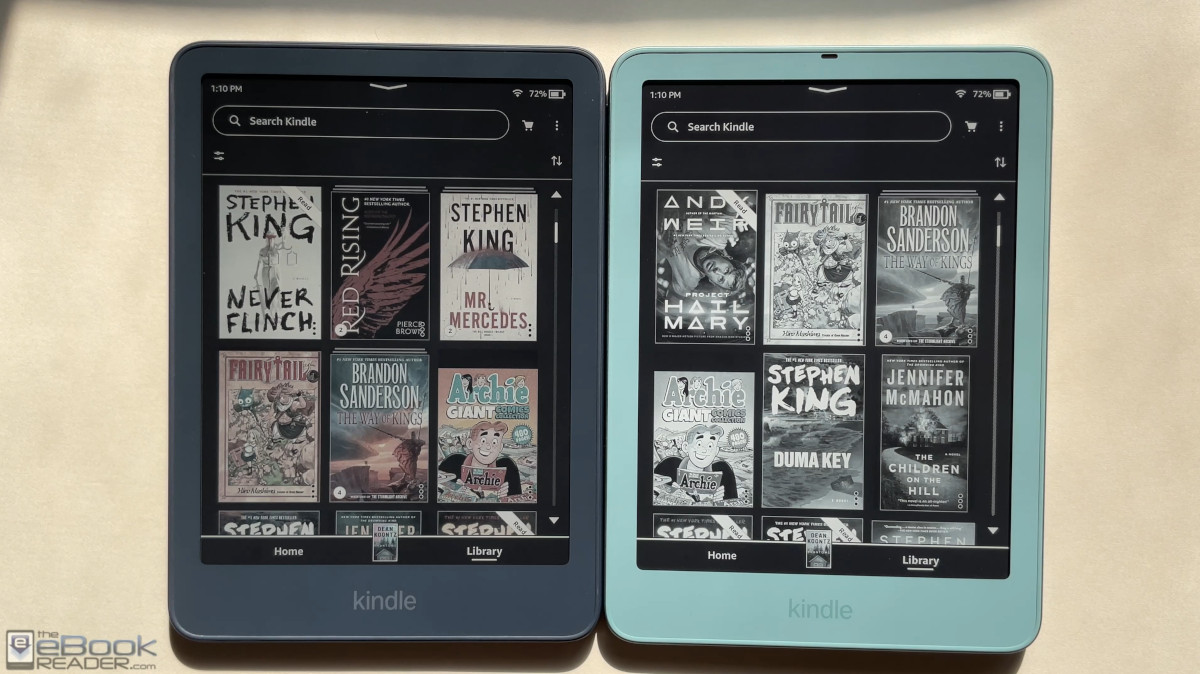
Here’s a comparison review between the new Kindle Paperwhite and the new Kindle Colorsoft for 2026.
Other than the screens, the two devices are nearly identical, so this mostly boils down to a screen comparison review.
But I’ll also cover the differences between the base versions and the upgraded Signature Edition models since I’m comparing the base Colorsoft to the SE Paperwhite.
Design
Both the Colorsoft and Paperwhite share the exact same design, with the same dimensions and the same weight. The only difference is the Signature Edition version of the Paperwhite is available in a Seaglass Green color, whereas the Signature Edition Colorsoft in available in a Fig color.
Both base versions are available in the new Graphite color, and both SE versions have that as a color option as well.
The cheaper base versions have a plastic back panel with a soft rubbery coating on it, similar to previous gen models, and the SE versions have aluminum backs with added magnets for magnetic cases.
Additionally, the base versions have 16GB of internal storage and the SE’s have 32GB. The SE also adds a rotation sensor, an auto brightness sensor, and they have contacts on the back for the Page Turn cover and charging dock.
As you can see in the video below, the rubbery coating shows marks and fingerprints, so it’s hard to keep it looking clean and new. The aluminum back has a colder feel to it, but it does warm up pretty fast when you’re holding it, and the aluminum versions weigh about 25 grams more than the base version.
I’ve seen some raise concerns about the aluminum being too slick, but to me they feel about the same in that regard. If anything, the rubbery version feels a little slicker to me, but it might get a grippier feel after breaking in some more.
Comparing Screens
It’s the same story as it’s always been when comparing color E Ink screen to black and white E Ink screen.
Color E Ink screens are great if you want to see things like covers, comics, images, highlights and bookmarks in color, but it comes with some drawbacks in terms of the overall clarity and contrast of the screen.
Black and white E Ink screens have better contrast, with a lighter background color, and a clearer appearance overall without the added color grid layer.
The Colorsoft technically has the same black and white screen as the Paperwhite, but it has an added color filter layer over the top of that screen, which limits the amount of light that can pass through, giving it a darker appearance.
This is the kind of thing that is better seen than explained—refer to the video below for a closer look. The same goes for comparing the frontlights…
Frontlights
I copied this from my original Paperwhite vs Colorsoft comparison from 2024 because it’s still the same story with the 2026 versions:
“The frontlights look completely different on the two units I have. The Paperwhite’s frontlight has a yellower tone to it, whereas the frontlight on the Colorsoft has a bluer tone with the cool light and the amber light is darker.”
I can see some people preferring the frontlight on the Colorsoft because it does give a wider range of adjustment, and it can have a lighter, more neutral tone at the cool end of the spectrum. But my Colorsoft has a light bleed issue that my Paperwhite does not have.
Dark Mode
Dark Mode looks “better” on the Paperwhite’s screen for two reasons. One, the white text stands out a lot more because the white is brighter, which actually might not be preferable in some cases.
The second reason is the Paperwhite doesn’t have the light bleed issue along the borders of the bezel like my Colorsoft has. Hopefully this is just a quality control issue with the Colorsoft that will get worked out, and maybe it’s one of those things that only affects some units, but the only thing I can do is compare the two units that I have so that’s why I’m mentioning it.
Performance
Again, it’s the same story as the 2024 versions:
The overall speed and response of the two devices seems to be the same for most things. Page turn speeds are the same for ebooks, except when there’s color content on the screen. Whenever there’s color on the page, even if it’s just a highlight or a link, page refresh is slower on the Colorsoft’s screen, so stuff like comics is always is bit slower to turn pages since the page refreshes differently with color content.
Battery Life
Amazon gives different estimates for battery life on both models. They say the Colorsoft can last up to 8 weeks on a single charge and the Paperwhite can last up to 12 weeks. This probably comes down to the different way the Colorsoft refreshes the screen with color content.
Price
The base Kindle Colorsoft has a retail price of $289 in the US. The Signature Edition Colorsoft sells for $319.99.
The Kindle Paperwhite starts at $199 for base model, but you have to pay $20 extra to get rid of the lockscreen ads (the Colorsoft does not have an ad-supported option). The Signature Edition Paperwhite sells for $249.99 and it does not have lockscreen ads.
I still understand why Amazon charges so much more for the Colorsoft when it’s just a Paperwhite with a color filter layer. Other compaines don’t inflate the prices of their color models by that much.
Leave a Reply