
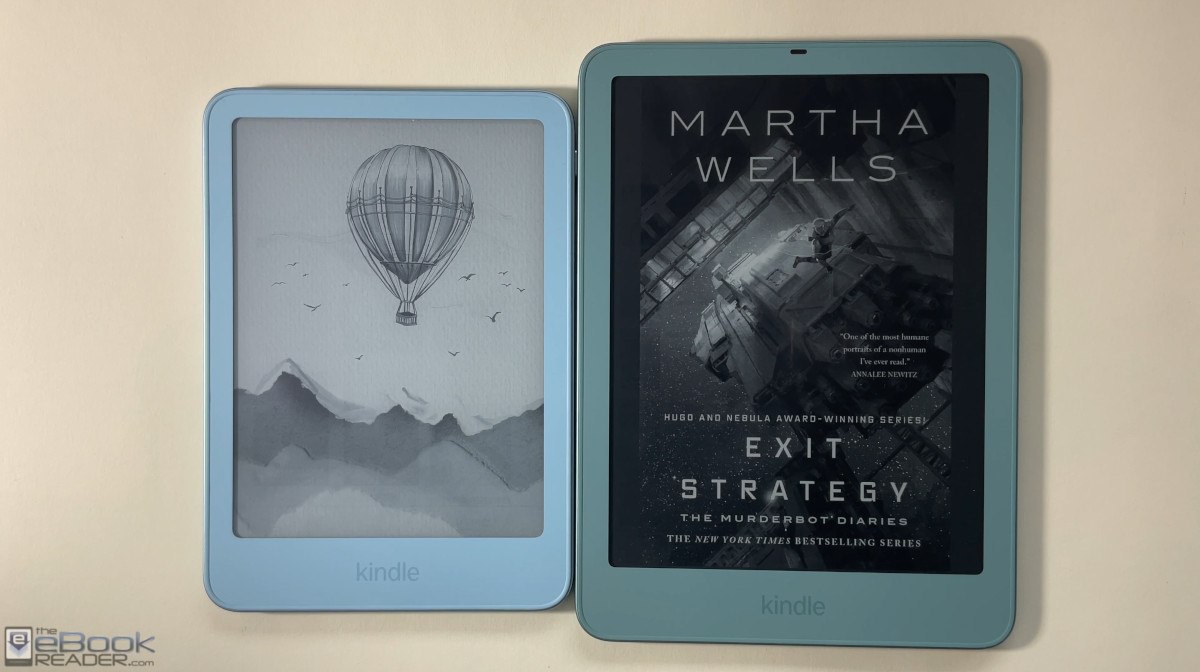
If you’re having trouble deciding which new Kindle to get, here’s a comparison review outlining the differences between the new 6″ Kindle and the new Kindle Paperwhite for 2026.
First off, both models are available with the option for aluminum or plastic sides and backs now. The aluminum versions look and feel very similar, but the cheaper plastic versions feel different. The 6″ Kindle is just basic plastic with a textured coating, whereas the base Kindle Paperwhite has a rubbery coating on it that feels similar to previous gen Paperwhites.
The 6″ Kindle is available in 4 colors, purple (Ube) and black (Graphite) for plastic versions, and Seaglass Green and Alpine Sky for aluminum. The Paperwhite is only available in two colors, Seaglass Green and Graphite, and the plastic version is only available in Graphite. The “Graphite” color has a lighter tone than previous gen black Kindles.
The aluminum versions come with twice as much storage space (32GB) and the lockscreens are ad-free so you don’t have to pay an extra $20 to get rid of the ads like you do with the cheaper plastic models. The aluminum Kindles also add magnets to the back for magnetic cases and accessories; the plastic versions don’t have magnets.
The aluminum Signature Edition Paperwhite also adds a rotation sensor and pogo connectors on the back for the Page Turn Cover and new charging dock. The 6″ Kindle does not support those. But the 6″ Kindle does support the new Kindle Click remote page turner.
The Screens
Now that the 6″ Kindle has a flush front screen like the Kindle Paperwhite, the two models are more similar than ever, and the Paperwhite no longer has the edge in the contrast department. Both have 300 ppi and the overall contrast is very similar.
There are subtle differences with the screens, but there are always subtle differences between E Ink screens and frontlights, even among the same models (as demonstrated in the 6″ plastic vs aluminum Kindle comparison). The bottom line is there’s not enough of a difference to say one is better than the other.
The Frontlights
One area where there is a noticeable difference between the two models is the frontlights. The 6″ Kindle just has a standard frontlight, whereas the Paperwhite adds a warm light that lets you control the color temperature.
Both frontlights have a similar color temperature at the cool end, and both are very uniform overall. There’s no yellow band on the Paperwhite like some of the previous gen models had, and it doesn’t have any of the light bleed that’s present on the 2026 Kindle Colorsoft.
One thing to note, the frontlight does seem to reflect more light off the inner edge of the bezel on the 6″ Kindle when using Dark Mode in a dark room, creating a brighter line. For some reason that effect is less noticeable on the Paperwhite. The graphite versions are probably the best color to minimize that.
Software/Performance
The software is nearly identical on both models, and there is no noticeable performance difference when it comes to navigating the interface, opening books, or turning pages.
The Paperwhite does offer a couple of extra features that are mysteriously missing on the 6″ Kindle. The Paperwhite has a page turn animation setting that can be enabled from the Aa menu under More, and it also has the option to disable the touchscreen for everything but page swipes to avoid accidentally activating the touchscreen.
Other Differences
The Paperwhite is waterproof (more like resistant) and the 6″ Kindle is not.
Kindle estimated battery life: up to 6 weeks.
Paperwhite estimated battery life: up to 12 weeks.
The Signature Edition Paperwhite adds a setting to turn pages and scroll by double-tapping the sides or back of the device.
The Paperwhite SE adds an auto-adjusting frontlight.
The Paperwhite SE adds a rotation sensor.
Plastic Kindles come with 16GB of internal storage; aluminum Kindles have 32GB.
The plastic 6″ Kindle weighs 140 grams, and the aluminum 6″ Kindle weighs 162 grams.
The base Kindle Paperwhite weighs 204 grams, and the aluminum Paperwhite weighs 229 grams.
Kindle measurements: 4.3″ x 6.0″ x 0.3″ (108.0 x 152.8 x 6.9 mm).
Paperwhite measurements: 5.0″ x 6.9″ x 0.3″ (126.8 mm x 174.7 mm x 6.8 mm).
All versions have user-replaceable batteries now.
The plastic-backed 6″ Kindle sells for $149 and the aluminum Kindle goes for $189.
The base Kindle Paperwhite sells for $199 and the Kindle Paperwhite Signature Edition sells for $249.
2026 Kindle vs Kindle Paperwhite Comparison
Full Reviews:
Kindle Aluminum Review
Kindle Ube Review
2026 Kindle Paperwhite Review (pending)
Thanks for the most realistic review on YouTube.
I have the 2024 Paperwhite SE. I do like the wireless table top stand, and the weight of the device.
I am not big on the weight increase regarding the 2026 Paperwhite SE. I can do without the auto brightness which is only for going into the sun and back inside. I do not need 32gb. I have over 1000 books downloaded and its not even 2gb. I can go without the added weight including the new page button case.
I cannot go without the warm light in the evening and for nighttime reading.
I did order the page turn clicker which will be a major addition including the easy brightness adjustment, next to pulling down to adjust the brightness.
I will not upgrade to the Paperwhite nor the SE, unless you do an e-ink comparison of the 2024 and the 2026 Paperwhite (Not SE) and there is a major improvement. I am planning on waiting until next year and see if they come out with a 20th anniversary kindle
Viewing the six inch and the seven inch side-by-side, the six inch Kindle is something I will consider if they go on sale for Black Friday. I do like the idea of a smaller and lighter Kindle. But, the six inch would be a on-the-go daytime e-reader.
The kindle department needs update the software on the six inch the same as the seven inch, there is no point of having it different considering the price increase.
Unless someone has an old Kindle, there’s no point buying any of the new ones. Certainly not if you have the last gen. The price hike is also another reason to hold on your device.
Hey Nathan, could you weigh the 2026 SE and then weigh it with the pager turn cover?
My 2024 Paperwhite SE is 215 grams.
Thanks
I don’t have a scale here where I’m at right now, but I did weigh the cover when I first got it and I think it was like 112 grams.
Meanwhile, Amazon is telling me that my cover is delayed by another FOUR DAYS.
I like that Amazon is at least giving people the “option” to have page turn buttons via the case for the new SE PW. For now, I’m content with the previous SE PW and my Oasis. I also have an older 2018 PW that is my backup should something happen to one of the other Kindles. (I need to figure out how to install the Bluetooth option on these since they are all jailbroke. I just haven’t remembered to search for this after the thought passes through my mind.)