
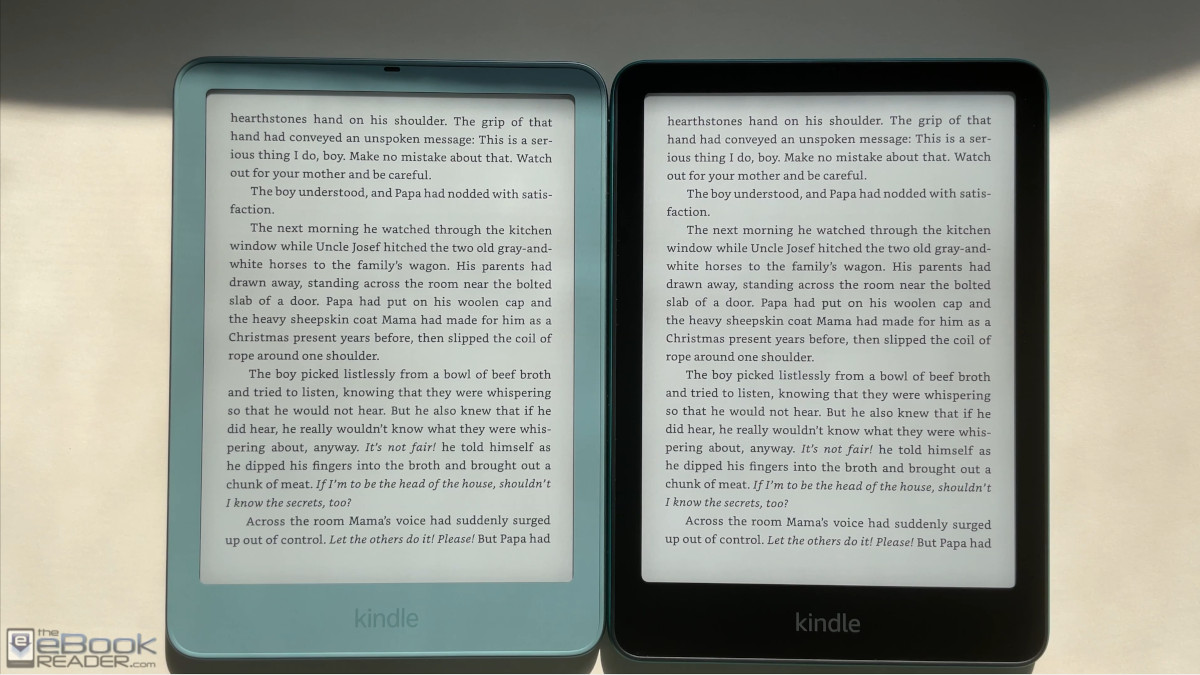
Here’s a comparison review between the new Kindle Paperwhite for 2026, which some people call the Paperwhite 7, and the previous generation model from 2024, which is sometimes called the Paperwhite 6.
On a side note, the 2024 Kindle Paperwhite is also known as a 12th generation Kindle, but I’ve seen zero evidence of Amazon calling any of the new 2026 Kindles 13th generation models. Everywhere I’ve seen, Amazon identifies the new Kindles with a “2026 release” designation. It looks like they’ve dropped the generations, which is probably a good idea since that gets confusing after a while, or maybe they were just superstitious about the number 13.
Either way, the 2026 Kindle Paperwhite is a lot like the 12th gen version. Both have 7″ E Ink screens, and while the new version is slightly thinner and smaller overall, the size difference is minor (in fact, if wasn’t for the new power button location you could fit the new model in previous gen cases), and I haven’t noticed any improvements as far as speed and overall performance goes.
The Design
Most of the changes with 2026 Kindle Paperwhite center around the design. All the new 2026 Kindles have user-replaceable batteries, so the entire casing has been redesigned, and they have flatter edges now, with back panels that are easily removable. Amazon also relocated the power button from the bottom to the side, and they added the option for an aluminum back with magnets for accessories.
The base Paperwhite has a rubbery soft coating on the back, similar to previous gen Paperwhites. One thing that stuck out to me right away, the bezel on the Graphite version has a lighter color than previous gen models. It doesn’t really look that different in the product pictures at Amazon so that was unexpected.
Once again, there’s a standard Paperwhite model with 16GB and an upgraded Signature Edition with 32GB. The standard Kindle Paperwhite is available in Graphite (black), and it sells for $199. At $249, the Paperwhite SE adds an aluminum back with magnets, and it’s available in Seaglass Green and Graphite. The SE adds an auto brightness sensor and doesn’t have lockscreen ads like the cheaper version and it also has contacts on the back for the new charging dock and Page Turn Cover.
Amazon did away with wireless charging on the new Kindle Paperwhite. The new one can still be charged “wirelessly” using the new charging dock, but it lacks the standard Qi wireless charging the previous gen had.
The Screens
Whenever a new Kindle gets released, there’s a segment of the population that always wants to know if the screen looks better on the new model compared to the previous version.
The short answer: yes, the screen looks slightly better on the 2026 Paperwhite. Is the difference detectable under normal reading conditions: not really, but if you’re a big fan of using Dark Mode, perhaps yes.
To me, the difference is negligible, but you can watch the video below and judge that for yourself. The black ink does look a little darker when using Dark Mode in particular, but it’s not enough of a difference for me to notice a difference when reading text using regular mode.
When I first got the Xteink X4 Classic with the newer screen and no added frontlight or touchscreen layers the contrast boost was immediately apparent the first time I used it. I didn’t have to directly compare it to anything else to notice the difference. The screen on the new Paperwhite isn’t anywhere close to that level of an improvement.
The front layer does appear to be a little thicker on the 2026 Kindle Paperwhite, as the shadow line that appears along the bezel is slightly larger. As far as reflectivity and glare and fingerprints with the flush layer—that all looks similar to me.
The Frontlights
One of the biggest improvements on my 2026 Kindle Paperwhite is the frontlight (frontlights can vary a lot so that’s why I’m referring to the one I have specifically). My 2024 Paperwhite SE has a yellower hue on the bottom part of the screen, whereas my 2026 Paperwhite has one of the most uniform frontlights I’ve seen.
Not all 12th gen Paperwhites had that issue, though. My first one did not, but again, you never know what you’re going to get with frontlights. For instance, the frontlight on my 2026 Kindle Colorsoft is noticeably bluer than my 2026 Paperwhite at the cool end.
Other Differences
KPW6 weight: 211 grams.
KPW6 SE weight: 214 grams.
KPW7 weight: 204 grams.
KPW7 SE weight: 229 grams.
KPW6 dimensions: 5″ x 7″ x 0.3″ (127.6 x 176.7 x 7.8 mm)
KPW7 dimensions: 5.0″ x 6.9″ x 0.3″ (126.8 mm x 174.7 mm x 6.8 mm).
The 2026 Paperwhite adds the option to rotate the screen in all four directions.
Leave a Reply