
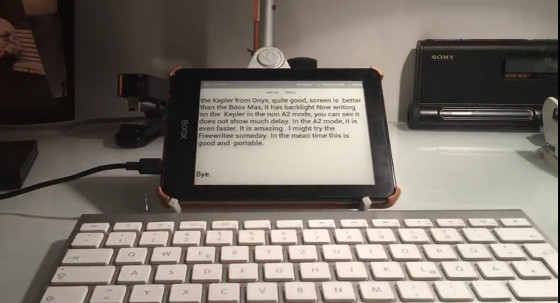
I came across a YouTube video that was recently uploaded showing one of the advantages of having an Android-powered ebook reader with Bluetooth.
The video demonstrates using a text editor app and a Bluetooth keyboard to type documents on an Onyx Boox Kepler Pro, a new 6-inch ereader from Onyx.
Using an E Ink device as an alternative word processor isn’t new by any means, but the problem is most ereaders don’t have the capability of connecting an external keyboard.
Doing so usually requires some serious hacking, as least when it comes to the likes of Kindles and Nooks.
Even a lot of Android ereaders don’t have any easy way to connect a keyboard. Many of them lack Bluetooth support or even OTG for connecting a keyboard via USB.
The larger Onyx ereaders like the N96 and Onyx Boox Max support Bluetooth, but a lot of the smaller models do not.
The Kepler Pro is one of the few 6-inch models that has Bluetooth, along with the new InkBook Prime.
Typing works surprisingly well on the E Ink screen and there’s not much of a delay at all. Take a look…
E-ink has an advantage over backlit displays when it comes to reading for long periods; focused on the screen.. For writing? Not sure why anyone would want this because writers aren’t as focused on the screen.
Seems to me that if you don’t want to go the Chromebook/full laptop route, a cheap $50 Fire and a $25 keyboard case for it would suit your needs just fine. Personally, I’ve a Kindle HD8 with a keyboard case and a BT mouse. It works just fine for simple, easily portable writing but it’s not a very satisfying laptop replacement for more complicated writing or other tasks.
Typing didn’t look so pleasant as it would on a laptop…
Some ChromeBooks are getting Android Apps and I believe that’ll be a nice replacement for Windows and Mac OS. I looking at the Asus Flip 10.1″ 4GB to purchase 🙂
Actually it looked quite painful; I could hear the guy grunting in the background while he typed. Plus it seemed it didn’t have a spellchecker or maybe even a word processor.
Too bad we can’t edit these comments after we post… I see where I should have typed: I am looking instead of I looking 🙁
but you can use it in bright sunlight unlike a laptop. looks good to me!