
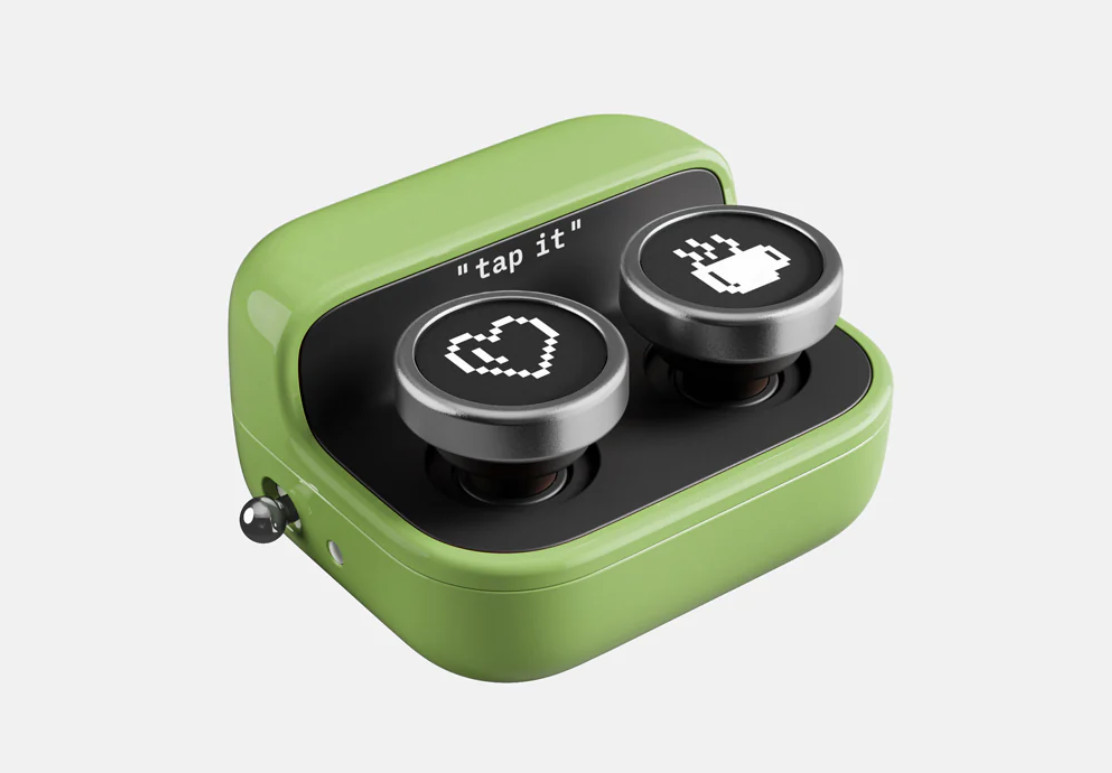
It looks like Onyx saw how popular Kobo’s new remote page turner was and they decided to release one of their own, and Onyx went in an entirely different direction with it.
I didn’t even suspect it was a page turner when I first saw it; I’ve never seen one quite like this before. It might be the most creative thing Onyx has put out in the past five years, considering they just keep re-releasing the same ereader and eNote models over and over again with minor changes.
They even gave it a funny name: the Boox Tappy. It has two buttons (and it comes with a set of replacement caps), a power switch, an indicator light, a lanyard hole, and there’s a USB-C port for charging.
They say it’s compatible with the Note Air5 C, the Palma 2 Pro and other Boox devices with firmware V4.2 or later that support Bluetooth. It supports three different modes when used with those devices, but I don’t see why it wouldn’t work as a basic page turner with other devices that support Bluetooth as well.
You can switch modes by holding down the buttons: there’s a Reading Mode for simple paging forward and back; there’s a Browsing Mode for scrolling up and down with vertical content; and there’s a Multimedia Mode for stuff like audiobooks and music for skipping to the previous and next tracks.
On Boox devices with firmware 4.2 and up, you can choose to invert the buttons’ functions and customize what the buttons do for double-click and long-press. You can even use them to do things like adjust the frontlight and take screenshots.
The Boox Tappy is available to order from Onyx’s website, but they don’t have them in stock in the US yet, and it’s not listed on their Amazon store yet. The price is $25.99 when ordered from their Hong Kong warehouse, but it’ll probably be a little higher when they start selling them in the US.
Update: The Boox Tappy is now available to purchase from Onyx’s Amazon store for $29.99.
That’s strangely cute. The o and x buttons make a little more sense than heart and coffee. Are you going to try it if it becomes available from Amazon?
Nah, it’s something I just don’t have a use for. I bought a page turner from Onyx several years ago before anyone cared about them, and I only used it like twice before it ended up in the closet.
I consider these just another money grab, they make sure only their page turner is ‘supported’ and gouge you with the price.
Luckily a few years back I came across the 8BitDo Micro Bluetooth Gamepad which has a keyboard mode and programable buttons and never looked back (especially since they’re like 6$ on aliexpress).
Just another useless gadget.