
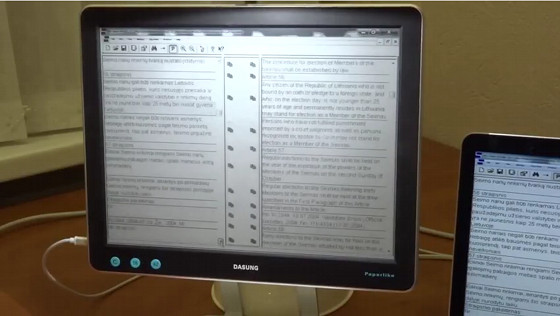
Earlier this year we first saw the PaperLike E Ink Monitor from Dasung, and now there are several video reviews on YouTube showing it in action.
The PaperLike is a 13.3-inch E Ink monitor that connects to a computer’s USB port to use the device as a secondary display. It uses so little power that the USB port provides all the power it needs to run.
The E Ink screen doesn’t have any light source; it’s like a regular E Ink screen without a frontlight, so it provides a completely different kind of reading experience than typical LCD computer monitors.
The PaperLike features a 13.3-inch screen with a resolution of 1600 x 1200.
The display uses E Ink’s Fina screen technology, which is glass-based, unlike Sony’s 13.3-inch DPT-S1 PDF reader, which uses a flexible plastic-based Mobius screen.
The Dasung PaperLike offers three screen modes for different combinations of details and speed. There’s a manual refresh button to press when the screen gets muddy with images and ghosting.
Several pleasantly-narrated video reviews of the PaperLike monitor turned up on YouTube yesterday. Take a look…
Very cool. If i could see this in a store and compare it to a Samsung Galaxy Tab S/S2 in Grayscale mode that would be great. I have found using the black background pdf readers with grayscale mode on super amoled screens to cut down eye fatigue a lot. There are ways to make a tablet a monitor, but certainly a straight up eink monitor would be preferred. 1k is a bit much, 500 and I would probably impulse buy it.
http://www.ebay.it/itm/Dasung-Paperlike-13-3-E-ink-Monitor-/281979859615?#shpCntId
Wow. Pricey. That’s twice as much as the new 13.3-inch Onyx Boox Max.
What is the delay in A2 mode? I watched the video on Youtube and delay there was about half a second. The author moves the mouse and in half a second the cursor starts moving. I’m worried about such a high delay.
https://www.youtube.com/watch?v=4-cVNJwhAqo
I was able to play games on the E-Ink screen using the electronic book Nook Simple Touch and a special patch. It looks like this:
https://www.youtube.com/watch?v=9fbD753xE-U
The delay between keystrokes and the action on the screen is almost nonexistent. Everything happens instantly. The frame rate is of course low, but i can play comfortably. What about Dasung E-Ink? What is the delay between pressing the key and the action on the screen?
The game is running directly on the Nook. And it works comfortably, despite the e-Ink screen. Using Dasung Paperlike, I would like to not only work with the text, but also play games. This is possible if the delay is minimal. After all, I can play on Nook, can I also play with Dasung PC-display? So I want to ask the people who own Dasung Paperlike how much delay and whether it allows them to play games.