
• Skip to main content
  • Skip to secondary menu
  • Skip to primary sidebar
  • Blog
  • Kindle
  • Onyx Boox
  • Kobo
  • Comparisons
  • Contact
  • About
  • Disclosure
The eBook Reader

The eBook Reader

The eBook Reader Blog

  • News
  • eBook Readers
  • Sales & Deals
  • Reviews
  • How To Guides
  • eBooks
  • Free eBooks

Kobo Touch Firmware Update Adds More Fonts and Layout Settings

July 1, 2011 by Nathan Groezinger

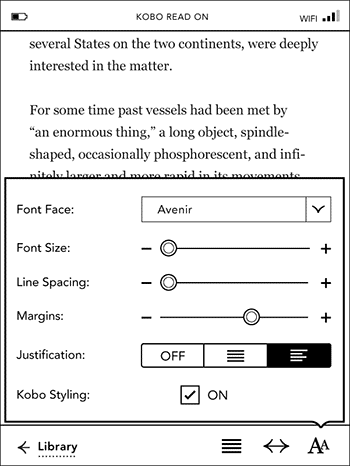
Kobo Touch Font Settings

Earlier this week Kobo issued an over-the-air software update for the Kobo Touch that added a smorgasbord of new font features in addition to various performance enhancements.

There are now options to adjust line spacing, margins, and justification. Kobo also added five additional font types to choose from: Amasis, Delima, Felbridge, Gill Sans, and Rockwell. And of course you can still add other fonts of your choice to a font folder.

What’s even better is that these features work on both Kobo and non-Kobo ebooks, although sometimes margins don’t seem to adjust on certain ebooks that have had their CSS modified with Calibre.

At launch the Kobo Touch didn’t have any layout settings, and just two font types, Georgia and Avenir. The lack of options was the main negative holding it back, especially in direct comparison with the very similar Nook Touch. But now the Kobo Touch has more layout settings than the Nook, with six margin settings, nine line spacing settings, and a lot more font choices and sizes.

Kobo just closed the gap considerably with this update. Now they just need to add notes and bookmarks, along with dictionary support and annotations for non-Kobo ebooks, and the Kobo Touch will be one mighty contender.

Filed Under: Kobo Tagged With: firmware update, kobo touch

Disclosure: This website earns commissions using affiliate links through Skimlinks and Amazon's Associates program.

Primary Sidebar

PocketBook Era Lite

New PocketBook Era Lite Getting Released with Built-in Libby App

Kindle Paperwhite Unregistered

Unregistered Kindles Don’t Get Software Updates?

Boox Tappy

Onyx Has Released a New Remote Page Turner Called Tappy

Kindle Colorsoft Update

Kindle Software Update 5.19.4 Now Rolling Out to Some Kindles

End of Support Kindles

How to Tell if Amazon is Dropping Support for Your Kindle

Navigation Menu

  • Homepage
  • The eBook Reader Blog
  • Comparison Tables
  • Kindle Comparisons
  • Best eBook Readers
  • Reviews
  • How To Guides

Follow

Site Search

Copyright © 2026 · Magazine Pro on Genesis Framework · WordPress