
• Skip to main content
  • Skip to secondary menu
  • Skip to primary sidebar
  • Blog
  • Kindle
  • Onyx Boox
  • Kobo
  • Comparisons
  • Contact
  • About
  • Disclosure
The eBook Reader

The eBook Reader

The eBook Reader Blog

  • News
  • eBook Readers
  • Sales & Deals
  • Reviews
  • How To Guides
  • eBooks
  • Free eBooks

Kindle for iOS Software Updated to 4.4

August 1, 2014 by Nathan Groezinger

Kindle iPad App

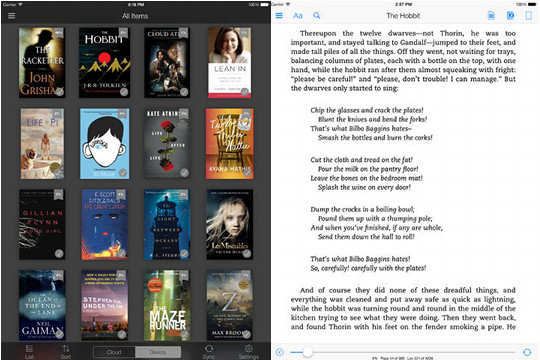
Earlier in the week Amazon issued a software update for their iPad and iPhone Kindle reading apps. The update adds some new features, and takes the software version up to 4.4.

Amazon took several customer-requested features and made them a reality with this new update to improve syncing and navigation, along with the usual performance and stability improvements.

Here’s the complete list of changes:

* Sync to the most recent page read – Any books you are reading on Kindle for iOS will now sync to the most recent page read across all Kindle devices and/or reading apps registered to your Amazon account. Customers can still manually sync to the furthest page read from the left navigation menu.

* Kindle Placeholders – Allow customers the freedom to explore other areas of the book without losing their current place. Jump directly to previous locations with “placeholders” on the progress bar.

* Notes Export – Studying for the next exam or writing the next term paper just got easier. Students can now export notes, highlights, and more to e-mail from their “Print Replica” textbooks, giving students easy access to their information.

* Performance and stability improvements

* Wikipedia Smart Lookup: Select a word and learn more from Wikipedia in the Info Card at the bottom of the page.

Kindle iOS App

Filed Under: Apple iPad Tagged With: apps, firmware update

Disclosure: This website earns commissions using affiliate links through Skimlinks and Amazon's Associates program.

Primary Sidebar

Xteink X4 Discontinued

XTEINK Confirms the XTEINK X4 is Getting Discontinued

Pocketbook Notes Mode

Video Demo of PocketBook’s Faster Highlighting and Dictionary Modes

Kindle Vera Jailbreak

New “Véra” Jailbreak Released for Latest Kindles with Current Software

Boox Bundle Deals

Quick Tip to Save Money Buying Boox Products on Amazon – Covert Sale

CrossPoint Dictionary Xteink

CrossPoint 1.5 for XTEINK X3 and X4 Adds Dictionary Support

Navigation Menu

  • Homepage
  • The eBook Reader Blog
  • Comparison Tables
  • Kindle Comparisons
  • Best eBook Readers
  • Reviews
  • How To Guides

Follow

Site Search

Copyright © 2026 · Magazine Pro on Genesis Framework · WordPress