
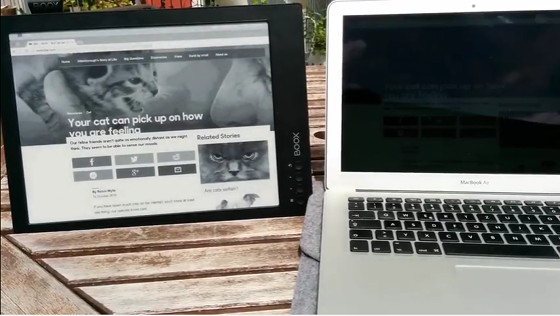
Have you ever wanted to use your laptop computer outside on a sunny day but then the bright sun makes it nearly impossible to see the screen, even at full brightness?
Some people like using E Ink screens as secondary computer monitors, and when you pair a 13.3-inch E Ink screen with a laptop, it can create a device that works great outside under bright sunlight.
The video below shows an example of someone using an Onyx Boox Max with a Macbook.
The laptop’s screen is being mirrored onto the 13.3-inch E Ink screen.
It also works with Windows computers. Here’s an earlier article about How to use Android ereaders as monitors.
The video really highlights how much better an E Ink screen looks in sunlight than a typical LCD display.
Even though E Ink doesn’t show color, the pictures are still very detailed and the text is extremely easy to read.
E Ink obviously isn’t going to work well for videos and such, but for reading, browsing the web, and stuff like word processing E Ink works quite well.
In fact these 13.3-inch screens look so good that it makes you wonder if they could start becoming more popular as secondary computer monitors. A company called Dasung has a new product called the Paperlike Pro, their second generation E Ink monitor.
Onyx is working on an E Ink laptop that looks interesting. Perhaps we’ll start seeing more E Ink monitors hitting the market soon. Now that I’ve gotten a chance to use the 13.3-inch E Ink screen on the Sony DPT-RP1 over the past couple of weeks, I can see why these larger screens are starting to become more popular lately—they look great and are a pleasure to read on.