
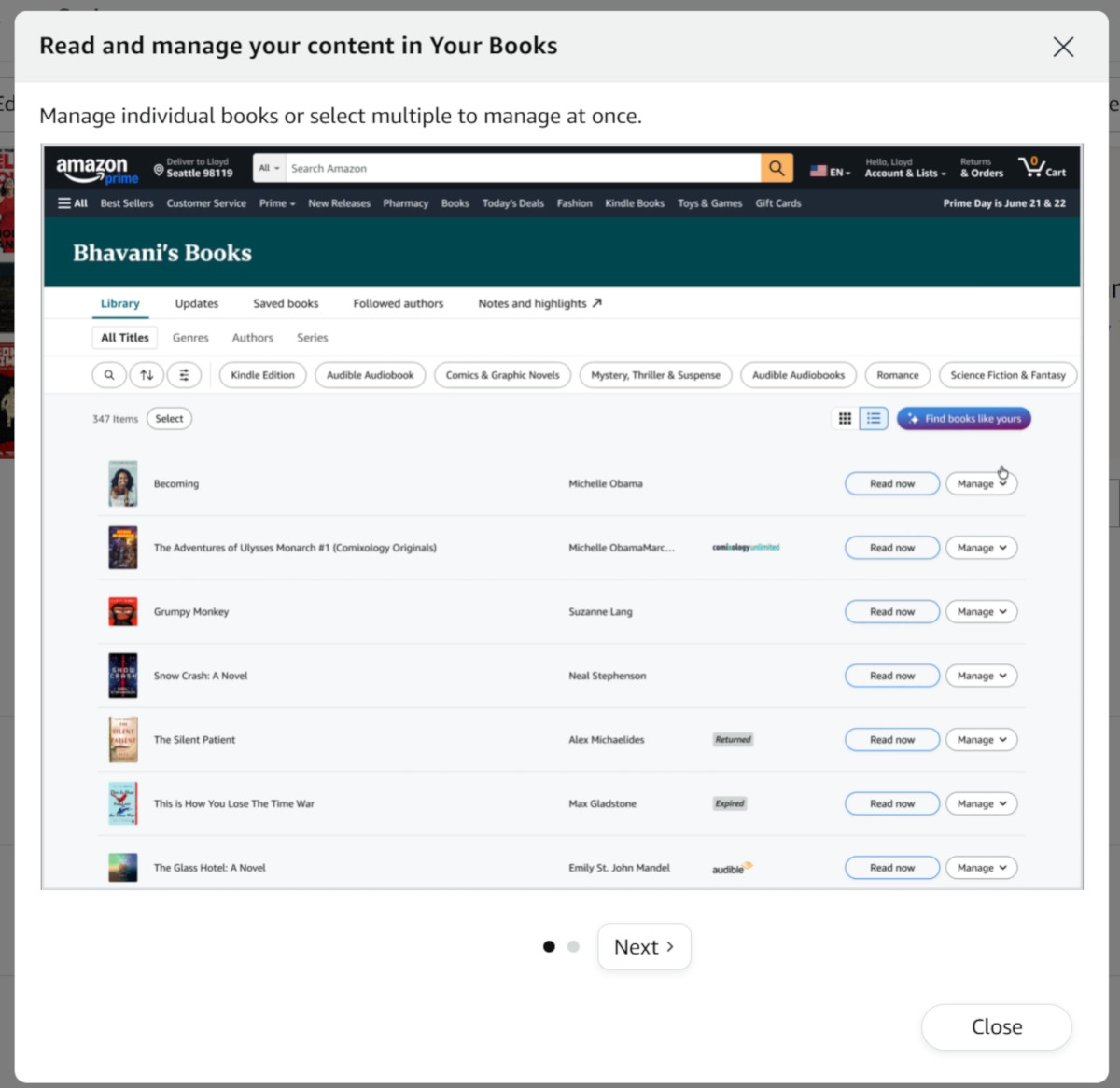
Amazon has started redirecting people to the Your Books page on their website instead of the Manage Your Content page that’s been around forever.
When you go to the Account section on Amazon’s website, or if you use the drop-down menu on the main account link at the top right, there’s a link for Content Library now instead of Manage Content, and it takes you to a different page than it used to.
The Your Books page isn’t new; it’s been around since 2023. But it looks like Amazon is going to start forcing people to use it now, and it makes you wonder if they’re planning on phasing out the Manage Your Content page.
For now, there’s still a link to the old page at the top of the Your Books page, but once you close the prompt it disappears and you can’t get it back until you refresh the page.
I’m still not sure if the change is good or bad yet, but it’s certainly different. The Your Books page has more features in some ways, but they’re also using it as yet another opportunity to try and sell you more stuff.
One main difference I noticed right away is the new page doesn’t have the option to download EPUB/PDF files for DRM-free ebooks; you still have to go the Manage Your Content page to do that.
The Your Books page shows audiobooks in addition to ebooks, and it includes paper books you’ve purchased as well. It also shows Kindle Unlimited ebooks that you’ve borrowed and returned, unlike the MYC page.
The drop-down menu on the Your Books page lacks some of the options from the MYC page. There’s no option to add or remove books from collections, for instance. It doesn’t show if books have updates available either.
It’s not all bad, though. There some additional sorting options. You can view books grouped together by genre or series or author, and you can sort by your ratings for books. You can hide borrows and samples as well.
What do you think of this change? Is it another example of enshitification, or is it actually for the better? If they’re going to do this I think they should add all the features from the MYC page to keep it from falling into the former category.
I don’t think that will bother me as much as the Google Games tab that now shows up on some games. I play Sudoku. The Google Games tab shows up on the right side. When an ad pops up, I’m unwillingly forced to watch. Then it replays. There’s no way I’ve found to exit unless I go to settings and force stop.
Have you written about this?
I have no idea what you are referring to.
Sorry. I forgot it’s Kindle. Not Google!
The Manage Your Content page allows multiple books to be selected and then an action taken for all of them. For example select multiple books and then send them to a device or devices, or select multiple books and put them into a Collection.
The picture looks like this would have to be done one at a time for each book.
I hope the ability to select multiple books and send them to a device or put them into a Collection is not taken away, I use this all the time.
You can select multiple books to send them to devices or add them to Family sharing (library), and the list is much longer than the MYC page, but there’s no way to manage collections from there, at least not yet.
I hope they add Collection management or keep Manage Your Content.
I hope Amazon doesn’t remove access to the old Content Library / Digital Content page.
For me, not being able to list and manage Docs in the Amazon cloud would be a big problem.
This change so far has been annoyingly tedious with some library borrows. I have to go and hunt/search and filter by library to find the book half the time to return. Added a few extras steps there when it used to be simple.
One thing I’ve sent feedback to Amazon about was to figure out if any of my ebooks have updates and have them sent to my kindle. Maybe I don’t have any now, but I see no way to simply ask to see the books I own and if any have any updates. Furthermore, it seems they not only show books I own but every book i’ve ever read from kindle unlimited in my list of books. For books in a series, they are automatically grouped together now as well.
This does not appear to be an improvement to me.