
• Skip to main content
  • Skip to secondary menu
  • Skip to primary sidebar
  • Blog
  • Kindle
  • Onyx Boox
  • Kobo
  • Comparisons
  • Contact
  • About
  • Disclosure
The eBook Reader

The eBook Reader

The eBook Reader Blog

  • News
  • eBook Readers
  • Sales & Deals
  • Reviews
  • How To Guides
  • eBooks
  • Free eBooks

Nook Color Android 3.0 Honeycomb Hack (Videos)

February 1, 2011 by Nathan Groezinger

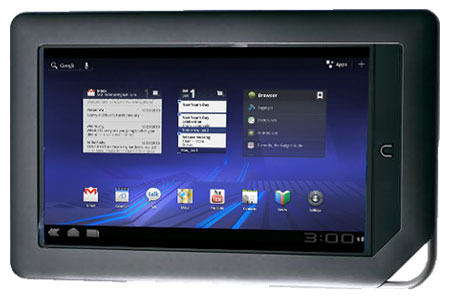
Nook Color Honeycomb

One thing is for sure: the Nook Color has a thriving hacking community. And the folks at XDA forums have done it again.

Google just released the SDK for Honeycomb—Android 3.0, the first version of Android designed specifically for tablets—on the 26th of January and now someone’s already managed to get Honeycomb running on the Nook Color.

The ROM is still in its earlier stages, but looks like it’s running pretty well in the videos below. The new browser and interface look promising. A couple of things not working are sound and DSP. But graphics acceleration, the accelerometer, wireless, touchscreen, and buttons are all working.

It is set-up to run off a microSD card and the image is around 4GB in size. You can find the download and instructions on this post at the XDA forums. I’m thinking about trying this on my own Nook Color but need to get another memory card first.

What about you? Got Honeycomb running on your Nook Color yet?

Nook Color Meets Honeycomb

Filed Under: Android, Nook Tagged With: hacks, nook color

Disclosure: This website earns commissions using affiliate links through Skimlinks and Amazon's Associates program.

Reader Interactions

Comments

  1. G says

    March 1, 2011 at 12:22 pm

    Does the nook color run lagy? Or is it prett smooth. With and with out honeycombe?

    • Nathan says

      March 1, 2011 at 2:18 pm

      The Nook Color runs very smooth. Honeycomb is somewhat lagy because it’s not the official version yet and I’m running it on a class 2 microSD card. Apparently class 6-10 cards run faster for the ROMs.

Primary Sidebar

Kindle Summer Edition

Kindle Paperwhite Kids Bundle On Sale, Including New Summer Edition

Older Kindle Scribe

List of New Features Not Available on Older Kindle Scribes

Xteink Custom Fonts

How to Add Custom Fonts to Xteink eReaders Running CrossPoint

Kindle-Paperwhite

I Can’t Believe Kindles Still Don’t Have This Feature

Xteink X4 Pro

New XTEINK X4 Pro Released with Touchscreen and Frontlight

Navigation Menu

  • Homepage
  • The eBook Reader Blog
  • Comparison Tables
  • Kindle Comparisons
  • Best eBook Readers
  • Reviews
  • How To Guides

Follow

Site Search

Copyright © 2026 · Magazine Pro on Genesis Framework · WordPress