

One of the good things about Android tablets is their software can often be modified from the original factory version to get newer software with more features, even when manufacturers fail to provide updates to newer versions of Android themselves. That’s case with the original Kindle Fire from Amazon. It runs an ancient version of […]
Amazon Kindle
Controlling a Kindle Paperwhite with a Remote Control (Video)
Sometimes when a gadget doesn’t come with all the features you would like it to have, you have to take matters into your own hands. That’s what a member over at Mobileread did with the Kindle Paperwhite. The person known as zxczxc wanted to be able to turn pages without having to hold/touch the Kindle […]
Waterproof Kindle Paperwhite Review – Kindle Goes Swimming with the Fishes
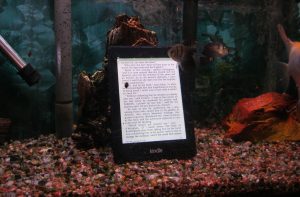
Last week I posted about a new waterproof Kindle Paperwhite from a company called Waterfi. They were nice enough to lend me one for review, so I did some tests to see if it really is waterproof. On the surface the waterproof Kindle Paperwhite looks exactly the same as my regular Kindle Paperwhite. There’s no […]
Kindle Fire Update Adds Battery % Meter and Breaks Wallpapers on Alt Launchers
While Barnes and Noble is making their Nook HD tablets more appealing by adding support for Google Play, Amazon is taking the opposite approach by locking down their Kindle Fire tablets even more from outside influences and forcing people to use the custom Kindle interface to keep the cycle of spending more money at Amazon […]
Waterproof Kindle Paperwhite Now Available in Time for Summer
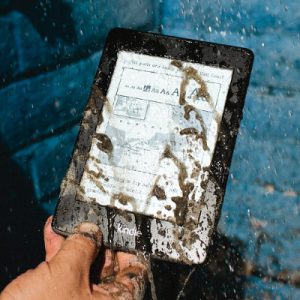
I’ve seen waterproof cases for the Kindle and other ebook readers and tablets before, and I’ve even heard of people putting their Kindle in a Ziploc bag to keep out moisture in watery venues, but now there is a company called Waterfi that is selling fully waterproofed Kindle Paperwhites out of the box. A waterproof […]
Strange Kindle Happenings: Kindle Keyboard Disappears, Kindle DX Back From the Dead
Here lately some weird things have been happening to the older Kindle models listed over at Amazon.com. In recent weeks the Kindle Keyboard, previously known as the Kindle 3, has seemingly been discontinued. Even though the Kindle Keyboard was several generations old, Amazon continued to sell it up until recently because of its unique accessibility […]
Amazon Appstore and Kindle Fire HD Tablets Now Available Globally
Amazon announced today that they have opened the doors of their Android appstore to nearly 200 countries worldwide. Previously it had only been accessible to those in the United States since launching in early 2011, and Japan and parts of Europe since fall 2012. This is good news for international tablet users because Amazon’s appstore […]
Amazon Buys Color Screen Tech Company – Color Kindles in The Near Future?
This past week Amazon purchased a company called Liquavista that specializes in an alternative type of display technology called electrowetting. Electrowetting displays are similar to E Ink displays used on current Kindles (Kindle ebook readers, not Kindle tablets) in that they are more energy efficient than traditional LCD displays and unlike LCD they are readable […]