The eBook Reader Blog

 Subscribe in a reader

Welcome to the eBook Reader Blog, where you can keep updated on the latest ebook reader news, free ebooks, ereader sales and discounts, and get hands-on, expert reviews of the latest new devices.

Please note that tags and categories only pertain to this blog, not the entire website.

Make sure to use the navigation to the left and the search box below to find more reviews and detailed articles about ebook readers and ebooks here on The-eBook-Reader.com.

Custom Search

Sales and Deals: eReaders and Tablets (11-22-11)

Logo

With Black Friday and Cyber Monday quickly approaching, there are already a number of sales and deals going on for ebook readers and tablets.

Some of these prices are really good, but don’t forget the ebook readers that have low prices all the time. I’d still recommend the $79 Kindle 4, $79 refurbished Nook Touch, and $149 Nook Color refurb over most ereaders that will go “on sale” in the coming weeks.

Read More

The Best eBook Readers for Less Than $100

Logo

Here’s a list of the best ebook readers that can be had for under $100. A couple of these are refurbished units where noted, but most of them are brand new.

This list consists of dedicated ebook readers only, no tablets. I’ll put together a separate post for low-cost tablets in the near future.

Read More

A List of eBook Readers and Their Font Choices

Fonts

Here’s a list ebook readers and the font styles each one offers. Now that ebooks have arrived to supplement paper books, it’s not enough to have just one font choice when sitting down to read.

Everyone has their own tastes when it comes to fonts, so having choices is definitely a good thing. Plus having more font options can be a real benefit for those with poor eyesight, in which case a nice bold font can work wonders.

Read More

10 eBook Readers Under $120 – Budget eReaders

Kobo WiFi, Oynx

Over the past year, ereader prices have dropped considerably. This time last year the Kindle and Nook were both selling for $259. The original Kobo was released in May 2010 for the all-time low price of $149.

Now there are several ebook readers priced under $120, even E Ink devices with paper-like screens. If you’ve been holding off getting an ebook reader, now is the time to get one for cheap.

Read More

MegaReader iOS eBook Reader Gets Update
Megareader

MegaReader is an ebook reading application for iPhone and iPad that just got updated to add some new features.

The most notable updates include adding iPad universal app support, multi-column support for Apple iPad, and integration with Instapaper 2.3.3, which allows you to read Instapaper articles in MegaReader.

Read More

Beam N Read LED Reading Lights Review

Beam N Read

A few weeks ago I was given a pair of Beam N Read LED lights to review as reading lights for ebook readers.

Since I don’t care for the way clip-on reading lights change the balance of an ereader, I thought it would be interesting to see how well the Beam N Read lights work.

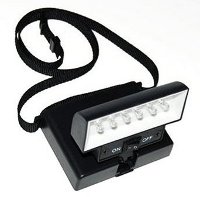
Instead of clipping on to an ereader or ereader cover, Beam N Read lights have an adjustable strap that is designed to be worn around the neck so that the light sits on your chest. The light housing pivots so that you can change the angle of illumination. This also works well if you set it on a flat surface next to a book or ebook reader.

There are several different kinds of Beam N Read reading lights. I tested the 6 LED Deluxe model (shown in the picture to the upper left) and the smaller version with 3 LED lights.

Beam N Read Light

The Deluxe model sells for about $27 on Amazon and comes with two filters, one red and one orange, along with a clip-on magnifier. The smaller 3 LED version sells for about $20 on Amazon and comes with a red filter and a set of batteries.

I found that both units work as advertised. I like the regular light without any filters the best, it’s a blue light. The LEDs are bright and provide a wider, more even light than clip-ons. They also come in handy for a number of other uses like needlework, crafts, and camping.

The battery life for these units is surprisingly good. Both run on 4 standard AA alkaline batteries. The 6 light model will work for 48 hours of use on a set of batteries and the 3 light model will last for 120 hours.

The 6 light model is quite a bit brighter, as you would expect, but the 3 light variety works just as well for ebook reading; both are designed to cover 2 hardcover or paperback book pages. Given the 120 hour battery life, the 3 light model is the better value, but I found the 6 light unit does cover the entire screen of a 6-inch ereader with a brighter, more even light.

Beam N Read Kindle 3

Incidentally, I found the build quality to be quite durable. Shortly after receiving them, I accidentally dropped the unit with 6 lights from about 4 feet onto the concrete floor. It landed with a crash. Batteries went flying everywhere. I cursed that I hadn’t even had a chance to try it out yet. But I rounded up the batteries and stuck them back in and it still works.

Overall, I found the Beam N Read lights work well enough to feel comfortable recommending them. Both are pretty lightweight—basically just the weight of the batteries—and sit comfortably on your chest. Once you start reading you forget that it’s there. Since they use LEDs, the lights remain cool; the units don’t get warm at all.

My only complaint is that the strap could be of softer quality. I found that it itches my neck after awhile, so I started making sure to always put it over the collar of my shirt instead.

Looking at the reviews for the two Beam N Read lights over at Amazon, both are highly rated. The 6 LED Deluxe model has 5 stars over 15 reviews, and the 3 LED light model has 4.5 stars with 7 reviews. All are 4 and 5 star reviews, with the exception of one 3 star review that also complained about the quality of the strap. One reviewer specifically mentions that it works well for the larger-screened Kindle DX, where clip-ons didn’t provide enough light.

Pixelar MReader Review

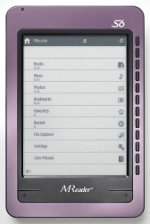
Pixelar MReader - Violet

Here’s a review of the MReader ebook reader that hails from a company called Pixelar in the UK.

The review covers all the details about Pixelar’s MReader and includes a hands-on video review and some photos. The MReader has WiFi built-in but the feature hasn’t been added to the firmware just yet because they are still in the process of getting everything set up with the ebook store(s) that it connects to.

I’ll update the review in a week or two when the firmware gets updated to add that feature.

Click here for the Pixelar MReader Review ยป

New eBook Reader App for eBooks.com; Coupon Codes for eBooks.com
Ebook Reader App

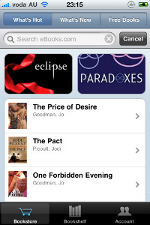
There’s a new iPhone and iPad app from eBooks.com called Ebook Reader. It’s available for free from the iTunes store.

According to the Ebook Reader website, the app supports iPhone/iPad format, ePub for Adobe Digital Editions, and unencrypted ePub.

Not sure what they mean by iPhone/iPad format; it certainly doesn’t support Apple’s proprietary ePub DRM. Perhaps it implies that they use a different format for sending ebooks to this app?

If you have an account with eBooks.com, all your previously purchased ebooks are supposed to be available in the app, as well as those purchased online and not within the app itself. The app can be installed on up to 3 iDevices per account so that you can read on whichever device you choose.

Here is the description of the Ebook Reader app’s features from iTunes:

  • Turn pages with a tap or swipe
  • Zoom with a pinch
  • Never lose your place in the book
  • Landscape or portrait orientation is lockable
  • Read sample chapters before you buy
  • Easy navigation inside the book
  • Night-reading mode is easy on the eyes
  • Adjust font size with a pinch or tap
  • Login with your existing eBooks.com account
  • Sync your eBooks.com online bookshelf with your Apple device
  • Free classics at your fingertips immediately
  • Shop for ebooks within the app
  • Buy New York Times bestsellers as well as technical, professional and academic books
  • Read your book online from any internet-connected device
  • Online backup – your online ebook library is always accessible, so anytime you get a new PC or phone, your books are ready to download from your eBooks.com bookshelf

September Coupon Codes for eBooks.com

Labor Day Sale at eBooks.com15% off on ebooks. Use code: labordaysalecp. Valid September 1 to 7, 2010.

Back to School Promotion at eBooks.com. Save 12% on Academics Books! Use coupon BTSBOOK%SALEcp upon checkout. Valid until 15-Sep-2010.

eBooks September Promotion. Save $6 on purchase over $60. Use code – 6off60ebookscp – until September 30, 2010 only.

Fall Promotion at eBooks.com Enjoy 12% off on minimum purchase of $40. Use code – fallreadingscp. Valid until 31-Oct-2010.

Use code: categorysalecp for 20% off at eBooks.com on subjects: Family, Social Science, Romance, Mathematics, Education, Humor, Medicine, Science Fiction, Transportation, and Foreign Language.

Celebrate Rosh Hoshanah by reading religious books! Save 15% off Religion category at eBooks. CODE: roshhashanahcp

Celebrate Eid al Ftr by reading religious books. Save 15% off Religion category at eBooks. CODE: eidalftr2010cp

Romance Category Books Sale – 20% off purchase on eBooks.com. Use coupon – categorysalecp

Grandparents Day at eBooks.com Enjoy 15% off upon checkout. Use code – grandparentscp – on books under the Family and Relationships category.

Qualcomm Invests $2 Billion for Mirasol Color Displays

Mirasol Color eReader Prototype

According to an article at DigiTimes, Qualcomm has found a major client for their 5.7″ color displays. So major that they are willing to invest $2 billion to build a new production plant in Taiwan.

So the big question is who is the major client? Given the fact that the article says this, the displays will most certainly be for ebook readers and not something like laptops:

Equipment installation is scheduled to begin in October 2011 and volume production at the beginning of 2012 mainly for 5.7-inch color applications.

So that most likely means that we’ll be seeing a color Kindle or color Sony Reader or perhaps even some other major company’s color ereader by 2012; who knows, the major client may even be a Chinese-based brand like Hanvon or Netronix, although Hanvon is already rumored to have a color E Ink device coming later this year.

Regardless of who the client is, a color Mirasol ereader is on the way, but likely not until 2012, unless Qualcomm’s existing production plant starts churning them out sooner.

Some benefits of Mirasol displays are they’re very energy efficient, are easily readable outdoors in bright light, can play video with refresh rates up to 30 fps, and are said to be less expensive than E Ink displays. Check out our dedicated Mirasol page for more details about how the IMOD technology works.

A Look at Qualcomm’s 5.7″ Mirasol Display

New Barnes and Noble Nook Reading Apps

nook apps

Barnes and Noble released a new Nook app for iPhone today and upgraded the iPad app. They also updated the PC app to carry the new Nook brand instead of the older eReader brand. I tested the new Nook for PC app and compared it to the old eReader app and the results were not good. B&N seems to have rushed this new Nook app because it is a complete mess. More on that later. But first, the iPhone app.

Nook for iPhone

With the Nook for iPhone app, US and Canadian residents can shop and download ebooks from Barnes and Noble’s online ebook store. The app has a decent feature-set, including adding notes and highlights, setting line spacing, changing font style, colors, and sizes, syncing with other Nook apps, and it can even lend ebooks for 14 days like the Nook.

There is also a dictionary, a setting to retain the publisher’s original setting to view the ebook exactly as the publisher and author intended, portrait and landscape viewing modes, bookmarks, and the ability to download, read, and delete free samples from within the application itself.

According to the press release, Barnes & Noble designed the Nook for iPhone app to optimize ebook cover art and text on the new iPhone 4′s Retina display, and it also works well on earlier iPhone and iPod touch models.

Nook for iPad

The updated iPad app brings a few new features like being able to rate your books and sort by favorites. B&N also added a new user guide and beginners tutorial to demonstrate the features of the Nook for iPad app.

Nook for PC

When I saw that Barnes and Noble had updated their PC app to have the Nook brand name, I assumed it would still be the exact same app as before. But unfortunately, it is not.

Strangely, opening the old app and clicking on the check for updates button yields no updates; you have to download the new app from B&N. The new Nook app is a separate program entirely and doesn’t affect the old eReader app in any way; both can be open at the same time.

The problem with the new Nook for PC app is that they’ve removed many of the features. You can no longer adjust font type, line spacing, justification, or change the background color, text color, etc. Worse, the app forces you to read in two column view with a giant margin in between the columns. Switching to full screen mode adds three columns with huge margins in between. What were they thinking? I don’t expect this to last long before they update it.

Keep Updated

Subscribe Get Email Updates

rss RSS Feed

Facebook Follow on Facebook

Twitter Follow on Twitter

YouTube YouTube Channel

Support This Site

Find this website helpful? If so, please help support this site. It's free, easy, and only takes a couple seconds. Learn how »

Latest Reviews
Latest Blog Posts